🛡️How to Interpret 3DS-Verified Transactions

Exempting Customers from 3DS Processing

When to Exempt a User from 3DS

Exempting a user from 3DS allows transactions to process without additional authentication, reducing friction and improving conversion rates. This is typically applied to:

  • Low-risk transactions (e.g., small purchases)
  • Trusted, repeat customers

    🚧 Note: Some issuing banks, especially in the EU, enforce stricter fraud rules and may override 3DS exemptions, declining transactions instead.

How to Exempt a User from 3DS

Merchants can exempt a customer from 3DS by:

  1. Navigating to the customer’s record
  2. Selecting Exempt 3DS Processing
How to Exempt a Customer from 3DS Processing

How to Interpret 3DS Transactions

Definitions

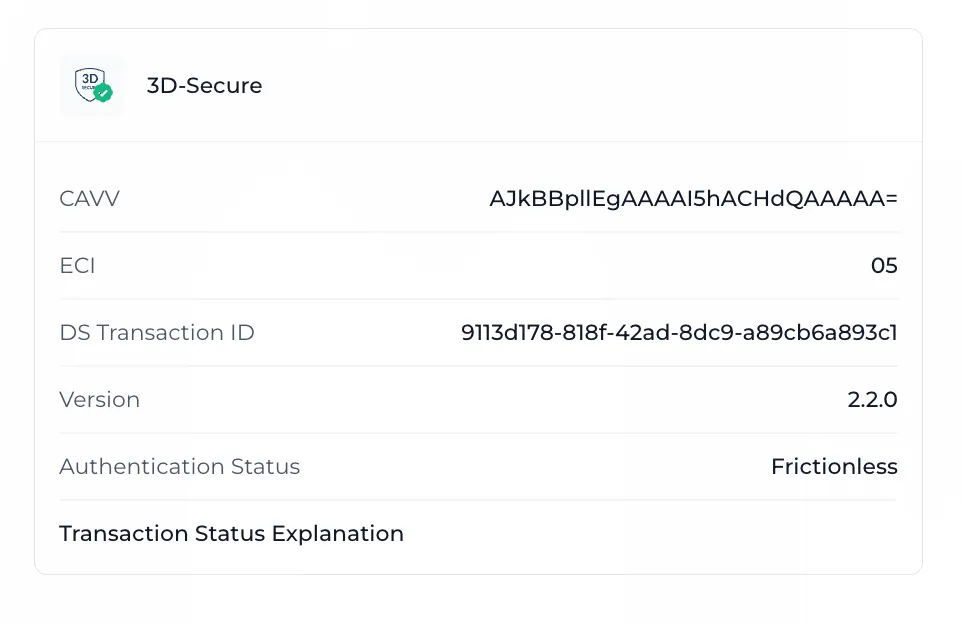
  • CAVV: Cardholder Authentication Verification Value, a unique code confirming the cardholder’s authorization.
  • ECI: Electronic Commerce Indicator, indicating the outcome of the 3DS authentication.
  • DS Transaction ID: A unique identifier for the transaction.
  • Version: The version of the 3DS authentication protocol used.
  • Authentication Status: The result of the authentication attempt (successful or failed).
  • Transaction Status: The result of the issuer’s authentication process.
  • Transaction Status Reason - Codes which represent why a transaction was approved, rejected, or flagged.
  • Reason Explanation - The explanation associated with the transaction status reason code.
  • Access Control Server (ACS) refers to the 3DS authentication process that facilitates communication between the card issuer, the merchant, and the cardholder.

Breakdown of Transaction Statuses

Transaction StatusDescriptionScenarios
Y (Yes)Authentication Successful: The cardholder was successfully authenticated, and liability typically shifts to the bank.Returned when the cardholder successfully completes 3DS authentication.
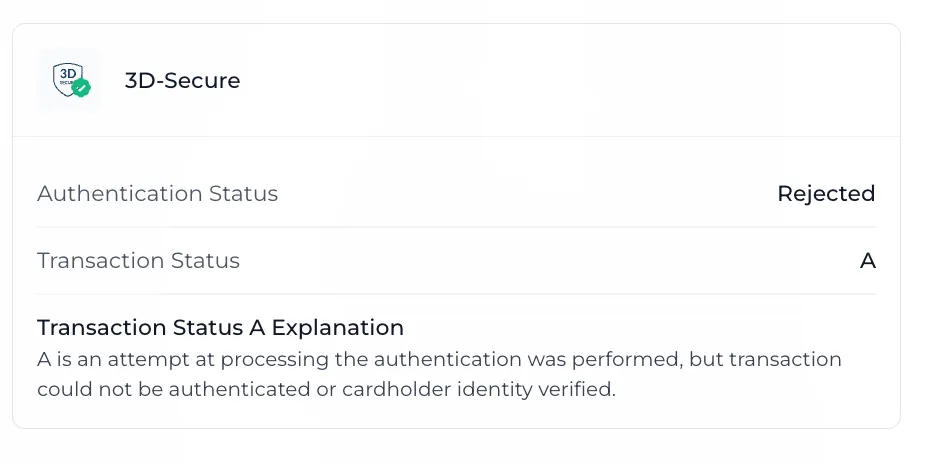
A (Attempted)Authentication Attempted but Not Fully Verified: The issuer didn’t fully authenticate the cardholder.Returned when authentication is attempted but not completed (e.g., issuer doesn’t support 3DS). See Details on the A status.
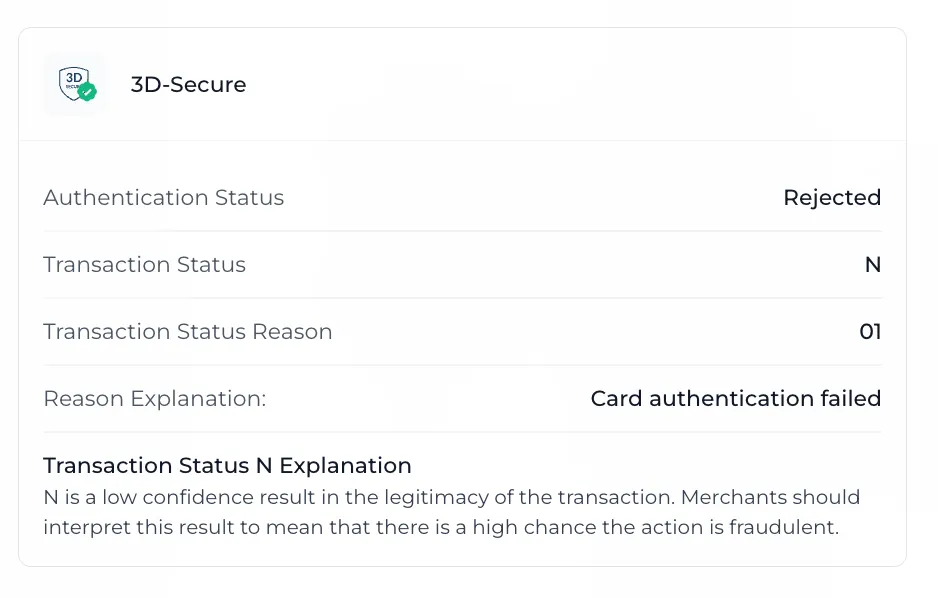
N (No)Authentication Failed: The cardholder failed authentication, or the issuer denied it. The merchant assumes liability.Returned when the cardholder’s credentials are incorrect or authentication is denied.
U (Unavailable)Authentication Could Not Be Performed: The authentication service was unavailable.Returned when the issuer’s authentication service is down or unreachable.
R (Rejected)Authentication Rejected: The issuer explicitly rejected the authentication request. The transaction should not proceed.Returned when the issuer rejects the authentication request due to fraud or invalid data.
C (Challenge)Challenge Required: The cardholder needs to complete additional verification (e.g., OTP, biometrics).Returned when a second authentication step is required for higher-risk transactions.

Details on the A (Attempted) Status

When Card Networks Return A (Attempted) Instead of the Issuer
If the issuer doesn’t support 3DS or has authentication issues, card networks (Visa, Mastercard, etc.) step in to assess the transaction using their own fraud detection tools.

  • Issuer Doesn’t Support 3DS: The card network may return A (Attempted) or U (Unavailable) if the transaction can’t be authenticated.
  • Card Network’s Role: The network evaluates factors like transaction amount, merchant category, and transaction history.
  • Outcome: If the card network approves the transaction, the issuer assumes liability. If the transaction is rejected, A (Attempted) is returned, and the issuer assumes liability while the transaction fails.

Breakdown of Transaction Status Reasons and Explanations

Transaction Status Reason CodeReason Explanation
00Authentication Successful: The cardholder’s identity was verified.
01Card authentication failed
02Unknown Device
03Unsupported Device
04Exceeds authentication frequency limit
05Expired card
06Invalid Card Number
07Invalid transaction
08No card record
09Security failure
10Stolen card
11Suspected Fraud
12Transaction not permitted to cardholder
13Cardholder not enrolled in service
14Transaction timed out at the ACS
15Low confidence
16Medium confidence
17High confidence
18Very High confidence
19Exceeds ACS maximum challenges
20Non-Payment transaction not supported
213RI transaction not supported
80 (mastercard)Identity Check Insights
80 (visa)Error Connecting to ACS
81 (visa)ACS Timed Out
82 (visa)Invalid Response from ACS
83 (visa)System Error Response from ACS
84 (visa)Internal Error While Generating CAVV
85 (visa)VMID not eligible for requested program
86 (visa)Protocol Version Not Supported by ACS
87 (mastercard)Transaction is excluded from Attempts Processing
87 (visa)Transaction is excluded from Attempts Processing (includes non- reloadable pre-paid cards and Non- Payments (NPA))
88 (visa)Requested program not supported by the ACS

Visual Examples

Successful 3DS Transactions
Rejected 3DS Transactions