Crypto Pay-Ins

This document shows how a merchant can generate a checkout link to accept payments in for users: credit cards, ach, crypto, apple pay, google pay, usdc and settling to the Coinflow in-app wallet.

Overview of How Pay-Ins Work
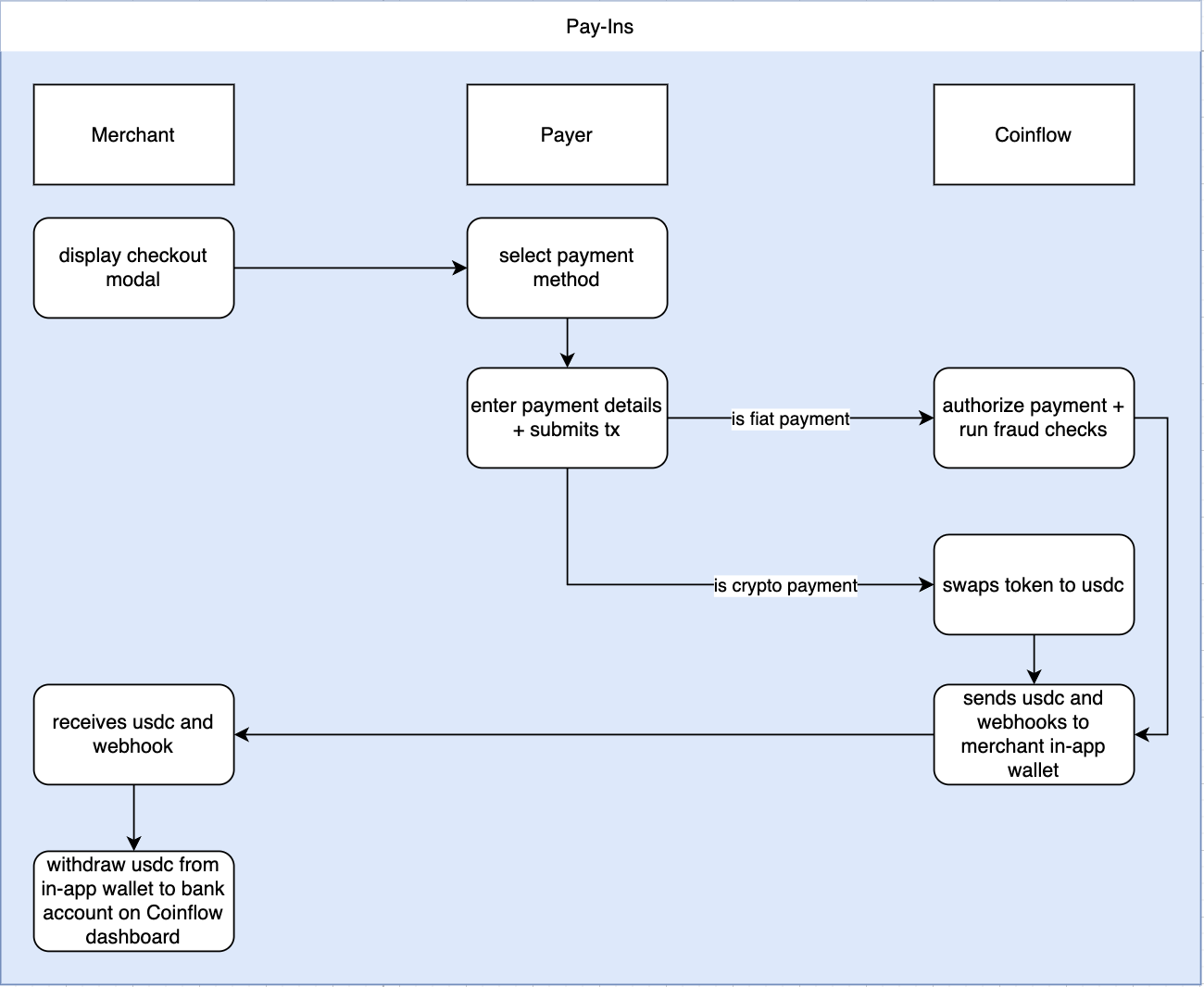
How Crypto Payins Work
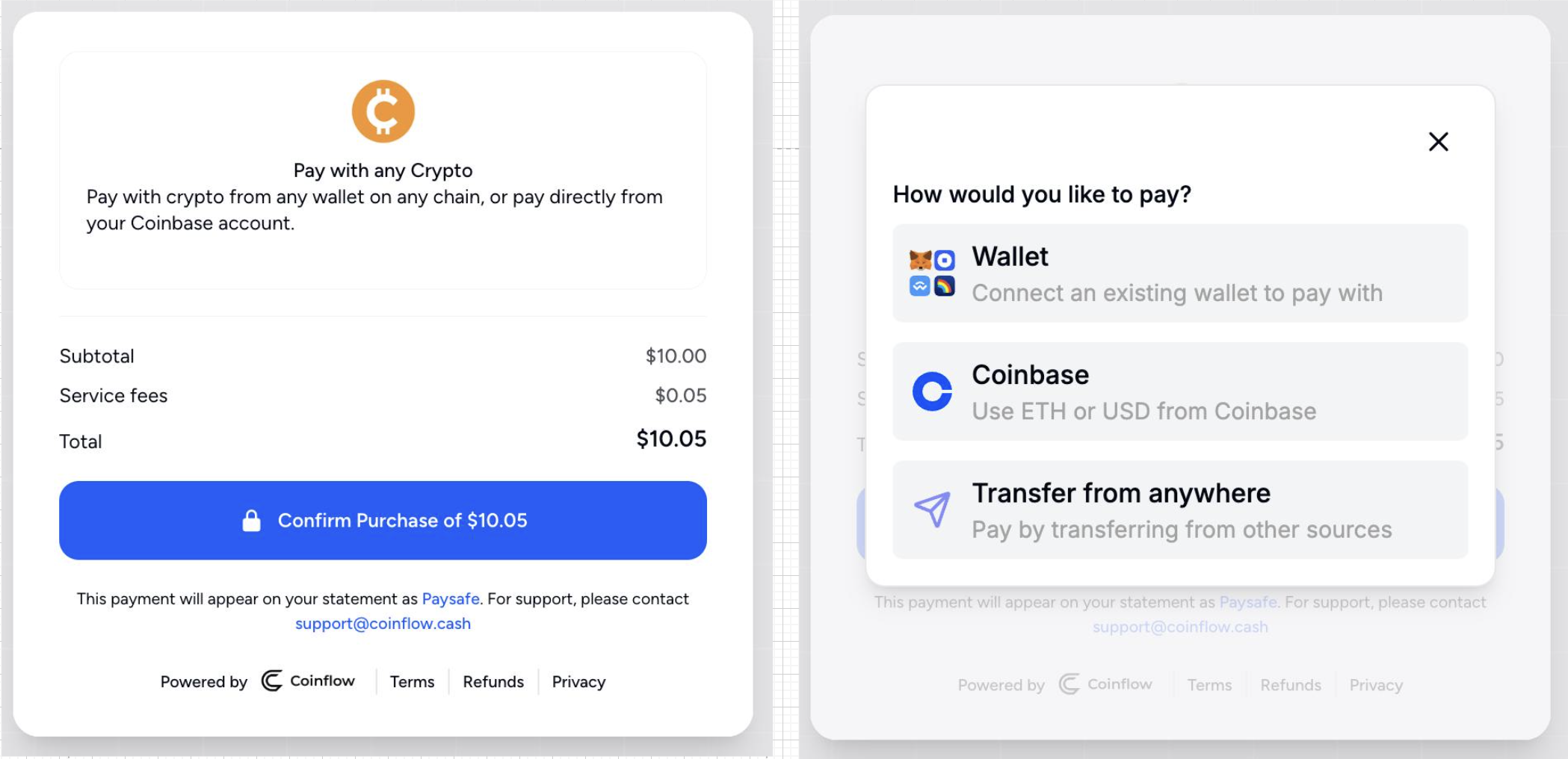
Payer selects payment by Crypto and selects source of funds for crypto payment
Payer selects payment by Crypto and selects source of funds for crypto payment.
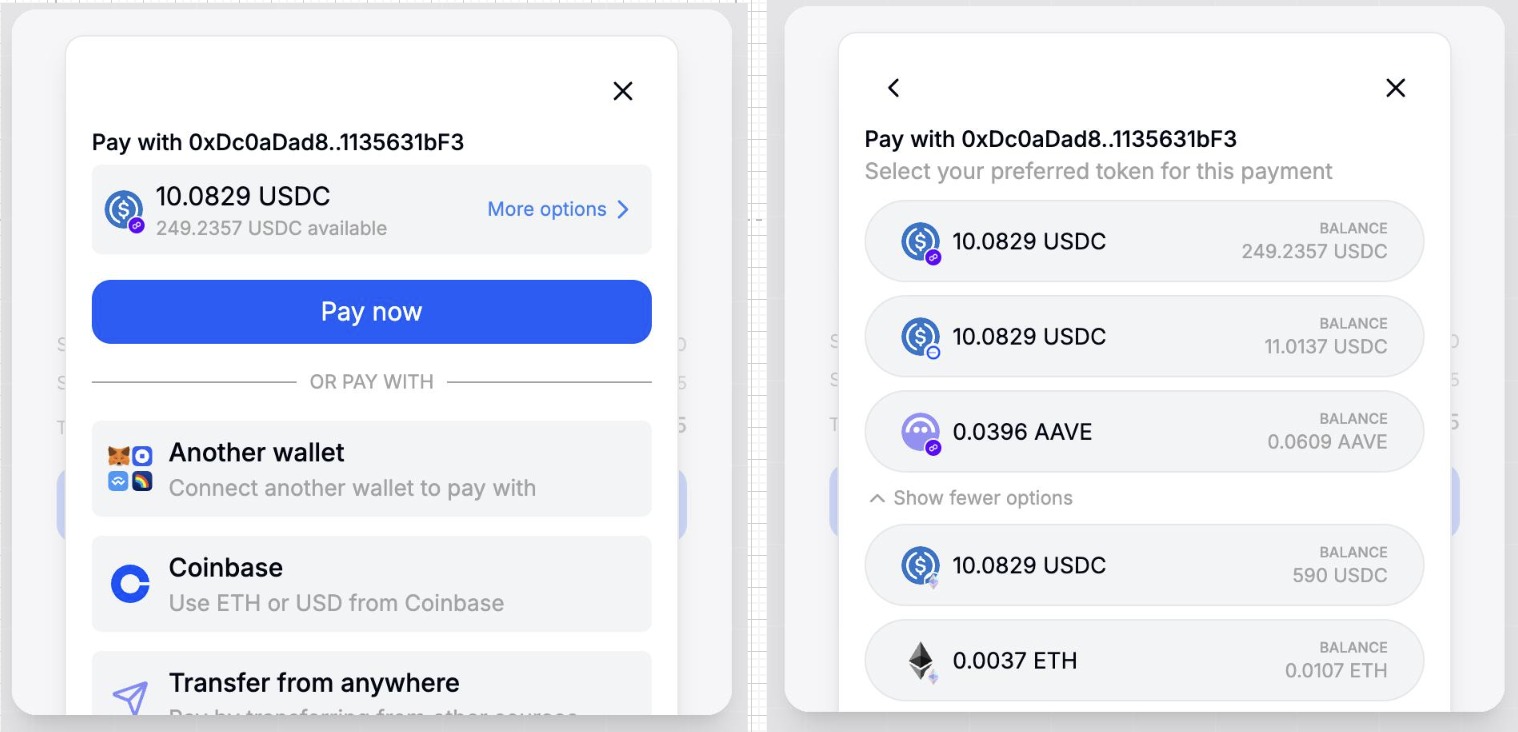
Payer with connected wallet sees all tokens on all chains and can select which token + chain to pay with

Payer with connected wallet.
(Payer sees all tokens on all chains and can select which token + chain to pay with).
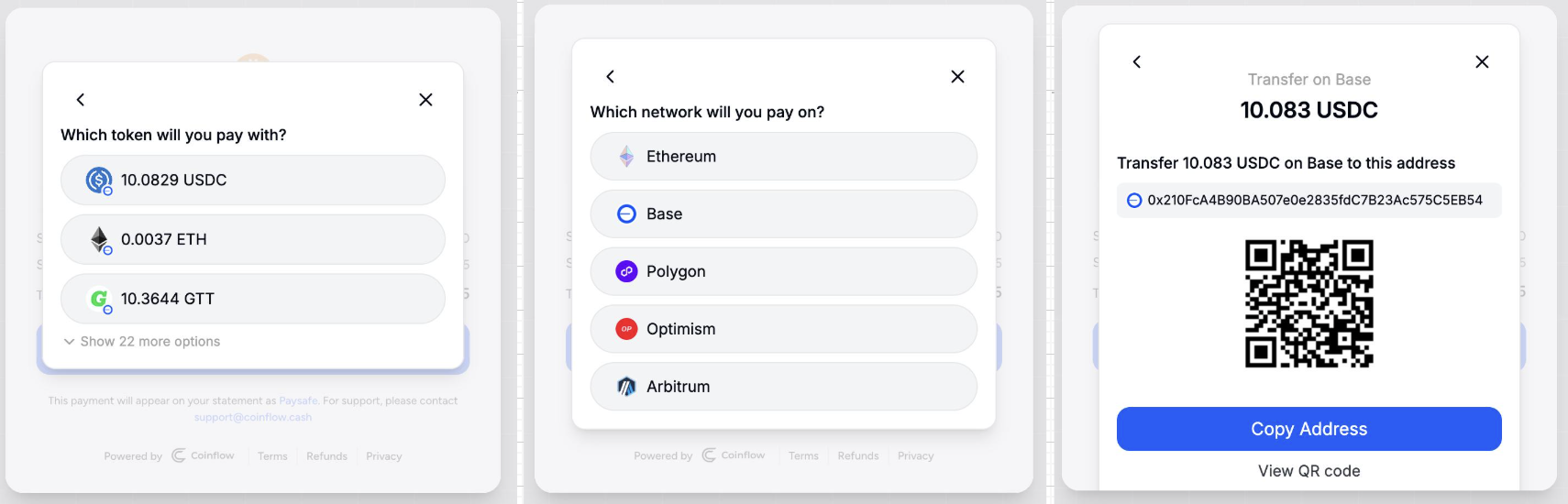
Payer who is paying from anywhere to an address.
(User selects the chain, which token, and is given an address to send the crypto to).

Payer who is paying from anywhere to an address.
(User selects the chain, which token, and is given an address to send the crypto to).

How Fiat Pay-Ins Work
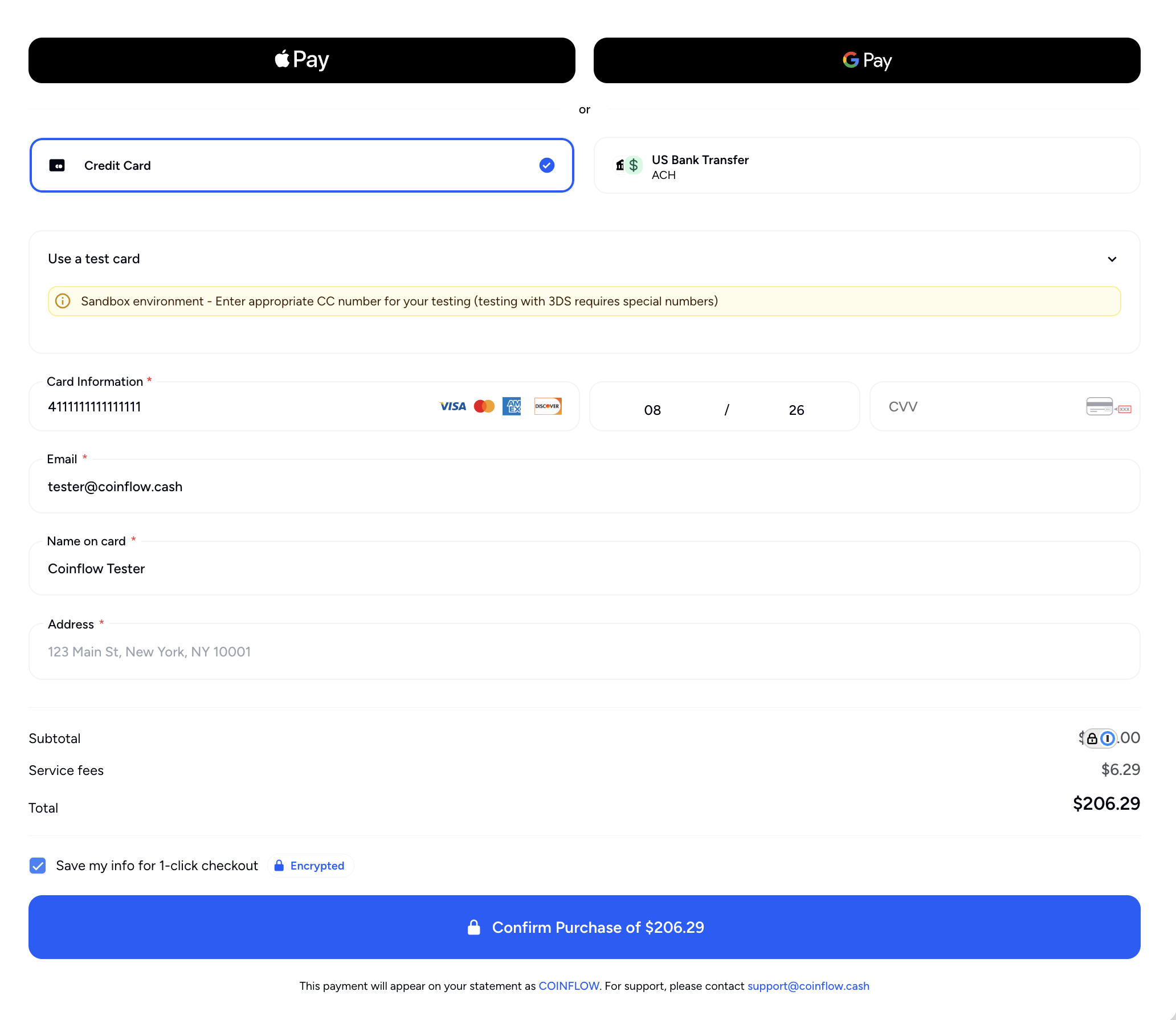
How the checkout modal looks with only fiat payments.

Setup

Developer Resources

Quick Links:

Authorization Headers:

  • Authorization - Your API Key from the merchant dashboard
  • x-coinflow-auth-user-id - A unique customer ID you use within your systems to identify the user withdrawing funds
  • x-coinflow-auth-blockchain - Should always be solana if your settlement location is the Coinflow in-app wallet
  • x-coinflow-auth-session-key - A JWT that authorizes the payer (valid for 24 hours, must be refreshed afterwards)

Checkout Integration

  1. Call the Get Checkout Link endpoint to generate a link to the checkout modal.
  • Note: x-coinflow-auth-user-id is a unique customer identifier the merchant uses to identify the payer
Request
1curl --request POST \
2 --url https://api-sandbox.coinflow.cash/api/checkout/link \
3 --header 'Authorization: YOUR_API_KEY' \
4 --header 'accept: application/json' \
5 --header 'content-type: application/json' \
6 --header 'x-coinflow-auth-user-id: mycompany-user123' \
7 --data '
8{
9 "webhookInfo": {
10 "example": "{\"description\": \"whatever webhook data you want to receive\"}"
11 },
12 "subtotal": {
13 "currency": "USD",
14 "cents": 300
15 },
16 "email": "mycompanyuser@gmail.com",
17 "blockchain": "solana",
18 "chargebackProtectionData": [
19 {
20 "productType": "inGameProduct",
21 "rawProductData": {
22 "example": "{\"description\": \"a description of the deposit\", \"sport\": \"online soccer game\", \"avgDepositAmount\": \"50\"}"
23 },
24 "productName": "yourProductName",
25 "quantity": 1
26 }
27 ],
28 "settlementType": "USDC",
29 "deviceId": "123456789",
30 "supportEmail": "support@mycompany.com",
31 "allowedPaymentMethods": [
32 "card",
33 "ach",
34 "googlePay",
35 "applePay",
36 "usdc",
37 "crypto"
38 ]
39}
40'
Response
1// Redirect the payer to the returned link or embed it in an iframe
2{
3 "link": "https://sandbox.coinflow.cash/solana/purchase-v2/YOUR_MERCHANT_ID?sessionKey=eyJhbGciOiJIUzI1NiIsInR5cCI6IkpXVCJ9.eyJjdXN0b21lcklkIjoiY2hhbGtib2FyZC11c2VyMTIzIiwibWVyY2hhbnRJZCI6InRlc3R0ZXN0IiwiaWF0IjoxNzQwMDgzNzg5LCJleHAiOjE3NDAxNzAxODl9.YJIdQvVsyyzyIBDwHkMM1H-k82jw9MlPP-YqR3ZW1j0&cents=300&currency=USD&email=chalkboarduser%40gmail.com&useHeightChange=true&jwtToken=eyJhbGciOiJIUzI1NiIsInR5cCI6IkpXVCJ9.eyJkYXRhIjoi456C4oKW26LXguCxoOOMgeuAg-iAjNmg4pya7YCT47CC5oGFxIzui4DhmIzUteq8peKugOeYleKvheOxgNqE4aiD646A4KeA4p6A3IDiuLTvgIHhlKHjkozhgKTlh4DRpeiEs-OxsMqx4oOC6YKz4pmI5qas4p6G6pS24Kaw0aPlgo7vjLjvmarpkKbqjILisrrhi6rupqDti6rlg5jqhqnshKDppqrupqnqrLPkoLrhh4Lpj5jmiJLuoabuqJDqi6nuhqHii6rphqHskaPjgaHon6HpoLLmlajujYfhhKDripHvoKHqpJfvoJvqkqLln5tcdWQ5ODfjgpXlqJHmg5NcdWRiMzDunLfjn5jqjKLpk5fYkuaOj-6vme6Lqe6qk-OLoeyCo1x1ZGE2MuWGqumKk-ixoOuOnuy3geqKkuWPm-mGqOqFoei5kumMtuGKvOemquWNqu6ureqgkeuAiOG-uOykh-6bs-ODrOWgtdOL3pLaqeihsOuiu-Wmje6JgeqEiOOQsuGEj-C2seqNmOCrt-WynuG0ouaUiuGAsOegjOGojOKGguSHoeW7uuS8qcSN5oC47YK86ZmY6qqP5Lqy7Iys6aGp4ZCN4KGr6pyH45Cw64WK4quPwofriajsqanjtoLguZ7lhqHsg6XpkY3ej-KHl-WPjOOWqueWueWlpuqTp-emquiltOGBlOaWgOmunOuStOW6nOGKiOSTsOKFsu2Et-G5i-C1tOqPqMel56Kw4oyO5I2E6aKi54Sn6rGc7Imk7Ked64Sa7pi65Zik6JSg5pak7Zmo6oGo7LyW5oWR7rG6xbnkhoPmkrPjoajmoJzirqXKmuqwquKiseyxluGPguaJguy2nuG1qOulicyN4oeh5bKR4Yqv6ISK5Jy344KQ4by04bmd6JWa5oa67oSm4rCH54qHXHVkZWFk4oGq6qq04aOg67Wn4o2C6oiI5qub6bSk4YOt5qSx6YK644ue7o2U5oq66Juj65Cz4Ymx7Yag4aaO4ZGc4a6o4oWk5pqg7ISJ7Jyw6oGz4oSA5oSE4rCm7qap5oGD44yJ6Yyu6o6Y4oqZ7oum47aL6oqB65Knz6Prs5HjtoHvg5DmjLHskLPmqaPrgKbjjZjhhJraoeqDtuGajuyFuOOgpuK8qeiymumuo-CvmO6mq-C1gOaBv-KbgOChtuGRseilou6irNaP5qug45Cd6LmQ4Lmu6IiJ6qi446yu2pHlm5TqlYToj5TuoKzko7Hqu5LhqK7mob7vnJjuo4Dpk6DltoDhqKTkjJ3gv7DnooHgu6bgrrLuobTiq6LohLbVhuGOmeuupO68peqArOOyquegkuucl-ivhuOgm-u-peiDkuWShOWqoO2EuMmJ7IOk6bCb7LSK76mO4b6L5K6B54Cb6LGl4aGR5qeP6Y6a6JC97J6C5qOk4bWm4Kmq4bCR4qWj6IaT6qKc5YWl4byn4Ymy6YOY5IWM4K6S47iQ7JGQ74qx4p6K7q-46ra04qir5aKE4pmK4pay5LiN4pSn6ZuN4YaHx5DYiey4huSnuuiUm-SCpuWkjt2b66Kt5ZmT64KAL-mAgCIsIm1lcmNoYW50SWQiOiJ0ZXN0dGVzdCIsImlkZW1wb3RlbmN5S2V5IjoiSUs3YmM4Y2ZiNy0xYmZhLTRjYTAtYjAwOC02MWJhMzFlY2YyZTYiLCJzdWJ0b3RhbCI6eyJjdXJyZW5jeSI6IlVTRCIsImNlbnRzIjozMDB9LCJpYXQiOjE3NDAwODM3ODksImV4cCI6MTc0MDE3MDE4OX0.mCLMnpHcLHosqHprT6FFLKlsDUhpmRHNUP370NrLsWk&allowedPaymentMethods=card%2Cach%2CgooglePay%2CapplePay%2Cusdc%2Ccrypto"
4}
  1. Embed the link in an iframe
    Merchants can either redirect the payer to the checkout modal link returned from Step 1 or embed the link directly in your website via an iframe. This is fully responsive so can be put into a container as small as 350px wide.
1<iframe allow="payment" src="<LINK>"/>

Implement via React/React Native SDK

  1. Install Package
    npm i @coinflowlabs/react
    npm i @coinflowlabs/react-native
  2. Generate Session Key
    Request
    curl --request GET \
    --url https://api-sandbox.coinflow.cash/api/auth/session-key \
    --header 'Authorization: YOUR_API_KEY' \
    --header 'accept: application/json' \
    --header 'x-coinflow-auth-user-id: user123'
    Response
    {
    "key": "eyJhbGciOiJIUzI1NiIsInR5cCI6IkpXVCJ9.eyJjdXN0b21lcklkIjoidXNlcjEyMyIsIm1lcmNoYW50SWQiOiJtZWxsbyIsImlhdCI6MTc1MDgwMTY0MCwiZXhwIjoxNzUwODg4MDQwfQ.4Sd7K_M5jZtEUuLS7GLL6ZlFcGpxEXGQWOe2_EU15J0"
    }
  3. Implement CoinflowPurchase Component
    CoinflowPurchase
    <CoinflowPurchase
    sessionKey={'eyJhbGciOiJIUzI1NiIsInR5cCI6IkpXVCJ9.eyJjdXN0b21lcklkIjoidXNlcjEyMyIsIm1lcmNoYW50SWQiOiJtZWxsbyIsImlhdCI6MTc1MDgwMTY0MCwiZXhwIjoxNzUwODg4MDQwfQ.4Sd7K_M5jZtEUuLS7GLL6ZlFcGpxEXGQWOe2_EU15J0'}
    merchantId={'mello'} // Replace with your merchantId
    env={'sandbox'}
    onSuccess={(...args) => {
    console.log('Purchase Success', args); // Redirect the user
    }}
    settlementType={SettlementType.USDC}
    subtotal={{cents: 300, currency: Currency.USD}} // Amount purchase is in (exclude prop if user is to choose a custom amount)
    webhookInfo={{
    itemName: "sword",
    price: "10.99"
    }} // Pass the webhook data you want to receive
    email={'user@email.com'} // User's email address
    allowedPaymentMethods={['crypto']}
    />

Next Steps