

👝 Settlement to a BYO Wallet
For Merchants Without Contracts: Learn How to Directly Settle Purchase Revenue into a Crypto Wallet.
This page is for advanced / cryptocurrency-native companies. If that’s not you, head back to the Quickstart for the standard flows.
Overview
Some merchants may want their purchase revenue to settle directly in their crypto wallet. This is most common for merchants who are already processing payments with other payment service providers, but want their purchases to settle instantly to USDC and don’t have a smart contract. This is possible with Coinflow and only requires a couple configuration steps. The key difference in this case is you don’t need to build a transaction for Coinflow to execute – simply let users purchase without extra work.
USDC settlement
Suppose you are building a donation website and want to allow users to donate money with a credit card, then receive the donations as USDC in your wallet. USDC settlement is perfect for this, and does not require your end users to send a transaction from their wallet.
1. Create a USDC Wallet
Solana
- Create a Solana Wallet. We recommend a multi sig on Squads.
- Send some USDC to the wallet. Sending USDC to the wallet creates an Associated Token Account for the wallet.
- Copy the ATA address. You will need it later.
EVM
- Create an EVM Wallet.
- Coinflow recommends multisigs for maximum security. Otherwise, a regular software wallet can be used.
- Send some USDC to the wallet. Sending USDC to the wallet creates the storage deposit for the wallet.
- Copy the Wallet address. You will need it later.
Stellar
- Create a Stellar Wallet with a G-prefixed public key. You can use any Stellar-compatible wallet such as Freighter or Lobstr.
- Establish a USDC trustline on the wallet. This allows your wallet to hold USDC on the Stellar network. Most Stellar wallets let you add a trustline from the asset management screen by searching for USDC.
- Copy the wallet’s public key (G-prefixed address). You will need it later.
2. Configure your USDC Settlement
- Go to the Merchant Dashboard and click on the “Settings” tab.
- Under the section
Earnings Settlement Settings, selectCrypto wallet. - Paste the wallet address copied in step 1 into the “Wallet Address” field. Confirm settlement location.
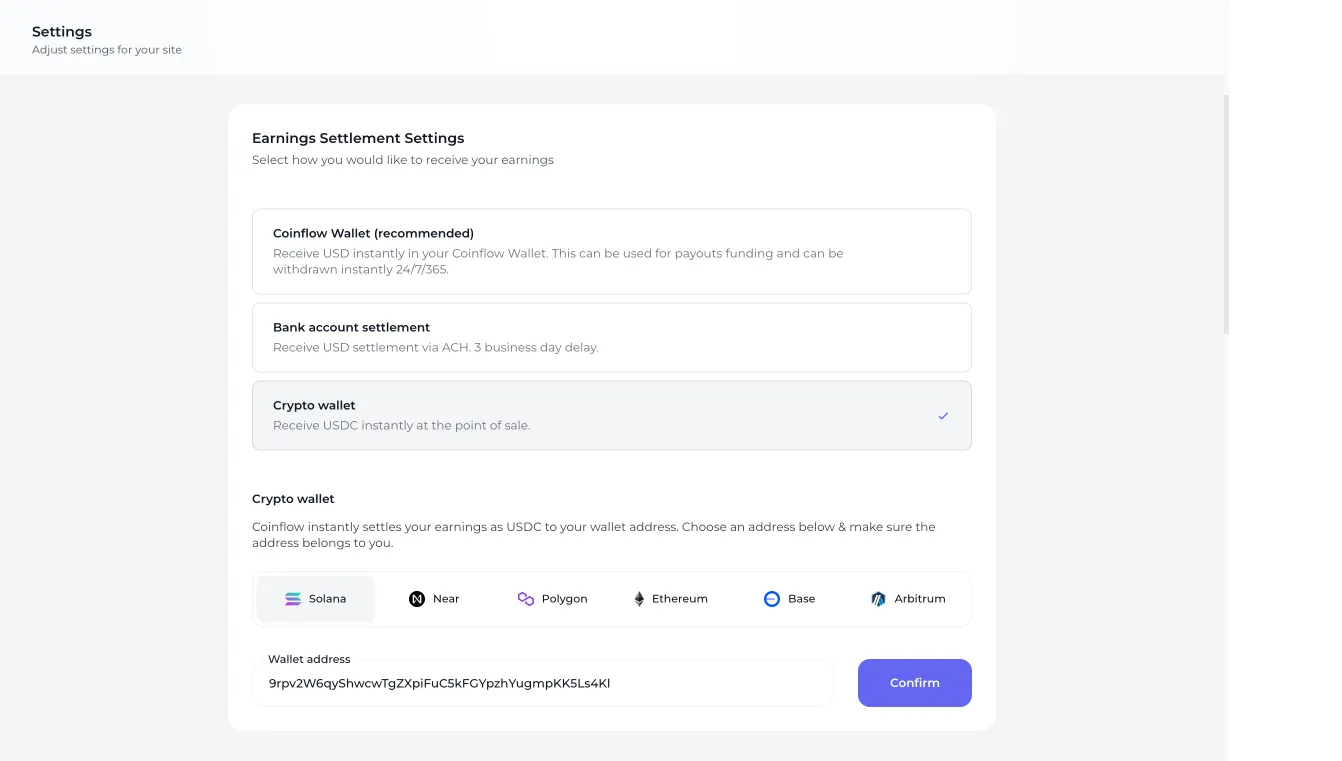
3. Test payment settlement
- Go to your checkout page and complete a purchase.
- You will see that when transaction is successful, but the USDC is sent directly to the wallet you specified above.
Implementation Notes
🚧 Do not use a
transactionprop in your<CoinflowCheckout />component.If using APIs, ensure you do not pass a transaction to the endpoint.