

Managing Subscription Plans and Subscribers
Overview
Once you’ve created subscription plans, you’ll need to manage them and monitor your subscribers. The Coinflow merchant dashboard provides a comprehensive interface for managing all aspects of your subscriptions.
Viewing All Plans
Access your subscription plans from the merchant dashboard:
- Log in to your Coinflow Merchant Dashboard
- Navigate to Subscriptions > Plans
- View all active and inactive plans
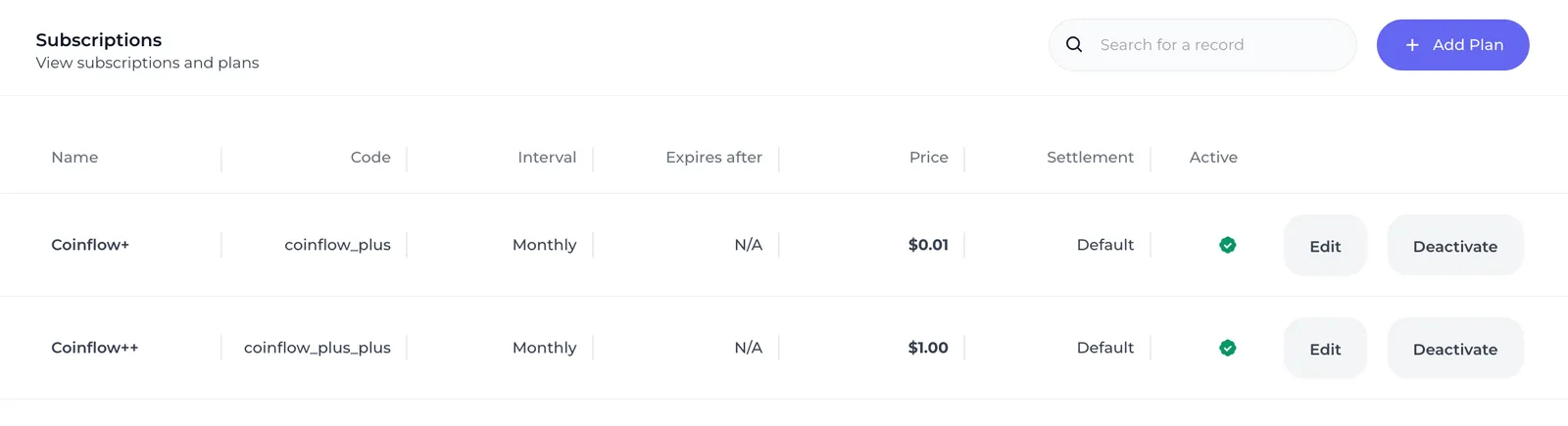
Plan List Information
For each plan, you’ll see:
- Plan Name - Display name shown to customers
- Plan Code - Unique identifier used in API calls
- Price - Amount charged per billing cycle
- Interval - Billing frequency (Monthly/Yearly)
- Active Subscribers - Current number of paying subscribers
- Status - Active or Deactivated
Managing Individual Plans
Click on any plan to view detailed information and manage subscribers.
Plan Details Page
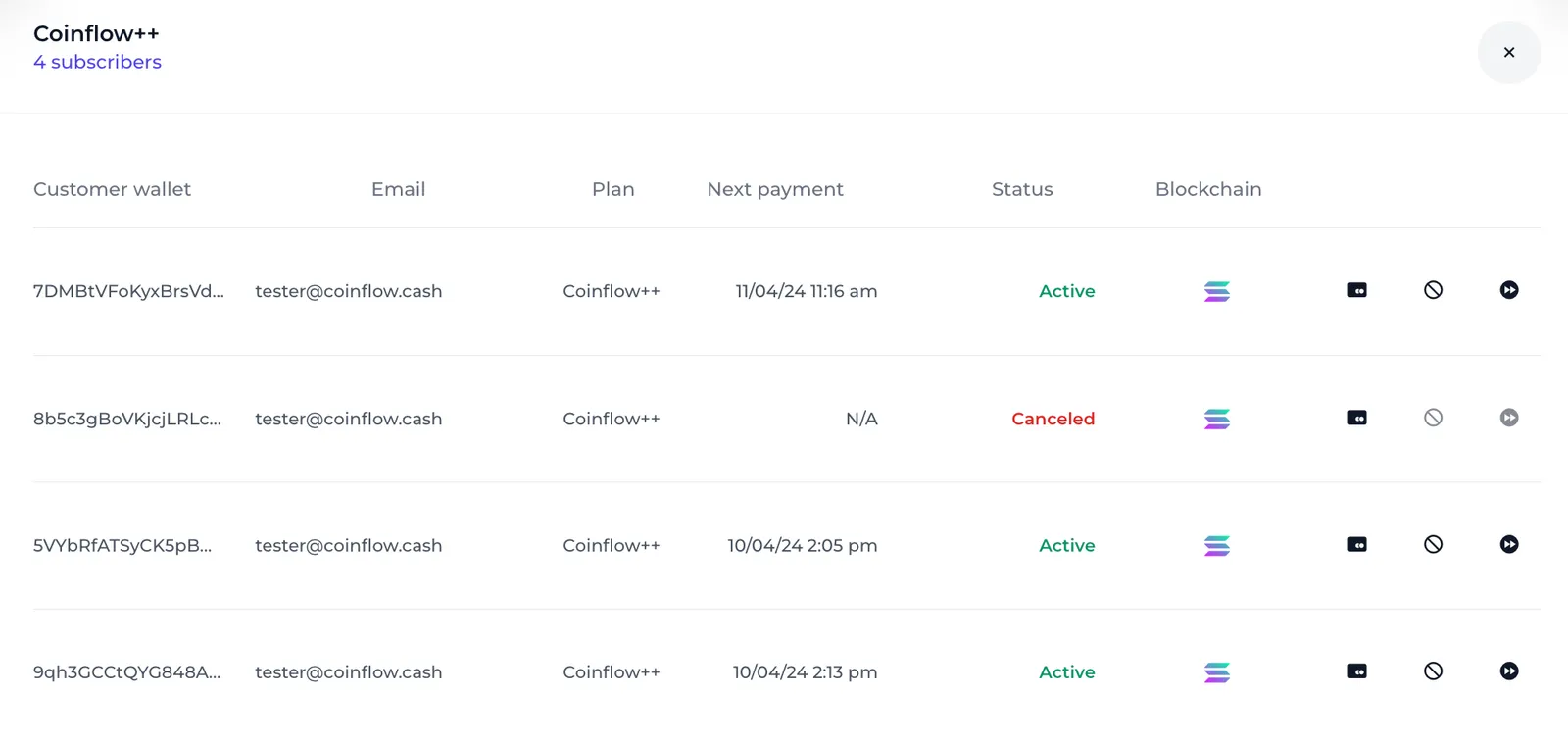
The plan details page shows:
-
Plan Information
- Name, code, and pricing
- Billing interval and duration
- Settlement type
- Creation date
-
Subscriber List
- All customers subscribed to this plan
- Subscription status for each customer
- Payment history
- Actions (cancel, view details)
-
Plan Actions
- Edit plan details
- Deactivate plan
- Export subscriber list
Subscriber Statuses
Each subscriber has a status indicating their subscription state:
Status Details
Active Status
- Customer is being billed successfully
- Access to subscription benefits continues
- Next billing date is scheduled
Canceled Status
- Customer or merchant initiated cancellation
- Access may continue until end of current billing period
- No future payments will be attempted
- Can be manually reactivated by creating new subscription
Failed Status
- Most recent payment attempt failed
- Subscription is suspended
- Coinflow will retry payment according to retry schedule
- Subscription may automatically cancel after multiple failures
Blocked Status
- Customer account has been flagged or restricted
- Usually due to fraud detection or policy violations
- Contact Coinflow support to resolve
Editing Plan Details
To modify an existing plan:
- Click on the plan from the plans list
- Click Edit Plan button
- Update the desired fields:
- Name
- Description
- Settlement type (can be changed)
- Click Save Changes
Note
You cannot change the price or billing interval of an existing plan. This protects existing subscribers from unexpected price changes. To change pricing, create a new plan version.
Deactivating Plans
When you no longer want to offer a plan:
- Navigate to the plan details
- Click Deactivate Plan
- Confirm deactivation
Effects of Deactivation:
- New customers cannot subscribe to this plan
- Existing subscribers remain active and continue billing
- Plan is hidden from your product pages
- Plan code remains reserved (cannot be reused)
To reactivate: Click Activate Plan from the plan details page.
Managing Individual Subscribers
Viewing Subscriber Details
Click on any subscriber to view:
- Customer email and ID
- Subscription start date
- Current status
- Next billing date
- Payment history
- All payments for this subscription
Canceling a Subscription
To cancel a subscription on behalf of a customer:
- Navigate to the plan details
- Find the subscriber in the list
- Click Cancel Subscription
- Confirm the cancellation
The subscription status will immediately change to “Canceled” and no future payments will be processed.
Payment History
View all payments associated with a subscription:
- Payment date and time
- Amount charged
- Payment method used
- Transaction ID
- Status (successful, failed, refunded)
Programmatic Management
You can also manage plans and subscribers via API:
Get All Plans
Get Subscribers for a Plan
Cancel Subscription (Merchant)
Exporting Subscriber Data
To export your subscriber list:
- Navigate to the plan details page
- Click Export Subscribers
- Choose format (CSV or JSON)
- Download the file
Exported data includes:
- Customer ID and email
- Subscription status
- Start date
- Next billing date
- Total payments made
- Lifetime value
Use this data for:
- Analytics and reporting
- Customer segmentation
- Churn analysis
- Integration with other tools
Monitoring Subscription Metrics
Track key metrics from the dashboard:
Plan-Level Metrics
- Active Subscribers - Current paying customers
- Total Revenue - All-time revenue from this plan
- Monthly Recurring Revenue (MRR) - Predictable monthly revenue
- Churn Rate - Percentage of subscribers who cancel
- New Subscribers - Growth rate
Overall Metrics
- Total active subscriptions across all plans
- Revenue by plan
- Subscriber growth trends
- Payment success/failure rates
Best Practices
Regular Monitoring
- Check subscription dashboard weekly
- Review failed payments and follow up
- Monitor churn trends
- Track which plans are most popular
Customer Communication
- Send email notifications for payment failures
- Communicate plan changes well in advance
- Offer easy cancellation (reduces chargebacks)
- Follow up with canceled customers
Plan Management
- Keep active plans to a minimum (3-5 options)
- Retire old plans by deactivating them
- Create new plan versions for price changes
- Use clear naming conventions
Data Management
- Export subscriber data regularly for backups
- Integrate with your CRM or analytics tools
- Set up automated reports
- Monitor for unusual patterns
Handling Common Scenarios
Failed Payments
When you see subscriptions with “Failed” status:
- Review the payment failure reason
- Contact the customer via email
- Request payment method update
- Coinflow will automatically retry failed payments
Subscriber Requests Plan Change
To move a subscriber to a different plan:
- Cancel their current subscription
- Have them subscribe to the new plan
- Or: Keep both subscriptions and cancel one after confirmation
Bulk Operations
For bulk subscriber management:
- Export subscriber list
- Perform analysis/modifications
- Use API for bulk operations
- Import results back into your system
Webhooks for Management
Set up webhooks to automate subscriber management:
Use these to:
- Update your database automatically
- Send customer notifications
- Trigger access revocation
- Update analytics