API Integration for Subscriptions

Developers can use this guide to implement subscriptions via UI or API

This guide shows you how to implement subscriptions using either the prebuilt UI component or direct API integration.

When to Use API Integration

Perfect For

Choose API integration when you need full customization

  • Custom branded checkout experience
  • Non-React frameworks (Vue, Angular, vanilla JS, mobile)
  • Complex subscription logic (trials, upgrades, prorations)
  • Multi-step checkout with additional business logic
  • Backend-only subscription management
  • Custom payment method collection flows
  • Teams with frontend development capacity

Integration time: 1-2 weeks for custom UI

Consider Prebuilt UI If

These scenarios work better with the prebuilt component

  • React/Next.js apps with standard subscription flows
  • Quick validation of subscription business model (hours vs weeks)
  • Limited resources for building custom payment UI
  • Standard checkout without complex customization needs
  • Faster time to market is critical priority

→ See Prebuilt Coinflow UI for fastest integration

Trade-offs: Speed vs Control

The prebuilt UI gets you live in hours with minimal code, while API integration takes 1-2 weeks but gives you complete control over the user experience. Both support the same payment methods, currencies, and business logic.


UI Implementation

Installation

Install the latest Coinflow packages:

$npm i @coinflowlabs/react

Configuration

To use the provided purchase page for subscriptions:

  1. Supply the merchantId and planCode in the CoinflowPurchase component
  2. The subscription cost and information will automatically populate the form

Example Implementation

1// Example of how to configure CoinflowPurchase for subscriptions
2<CoinflowPurchase
3 sessionKey={'eyJhbGciOiJIUzI1NiIsInR5cCI6IkpXVCJ9.eyJjdXN0b21lcklkIjoiZHdheW5lam9obnNvbjc1IiwibWVyY2hhbnRJZCI6Im1lbGxvIiwiaWF0IjoxNzUwMTk0MDM5LCJleHAiOjE3NTAyODA0Mzl9.4WQPzfu6niH2S7oE7KATJY9r1D_PB_ssPajaRz4Pvsw'}
4 merchantId={'YOUR_MERCHANT_ID'}
5 env={'sandbox'} // Change to 'prod' for production
6 onSuccess={(...args) => {
7 console.log('Purchase Success', args);
8 // Create your own on success function after payment success
9 }}
10 chargebackProtectionData={[
11 {
12 productName: "Subscription plan",
13 productType: "subscription",
14 quantity: 1,
15 rawProductData: {
16 description: "subscription to gold tier products",
17 productsInGoldTier: ["celebrity access passes", "cool merchandise"],
18 tradible: false
19 }
20 }
21 ]}
22 planCode={'12345'}
23/>

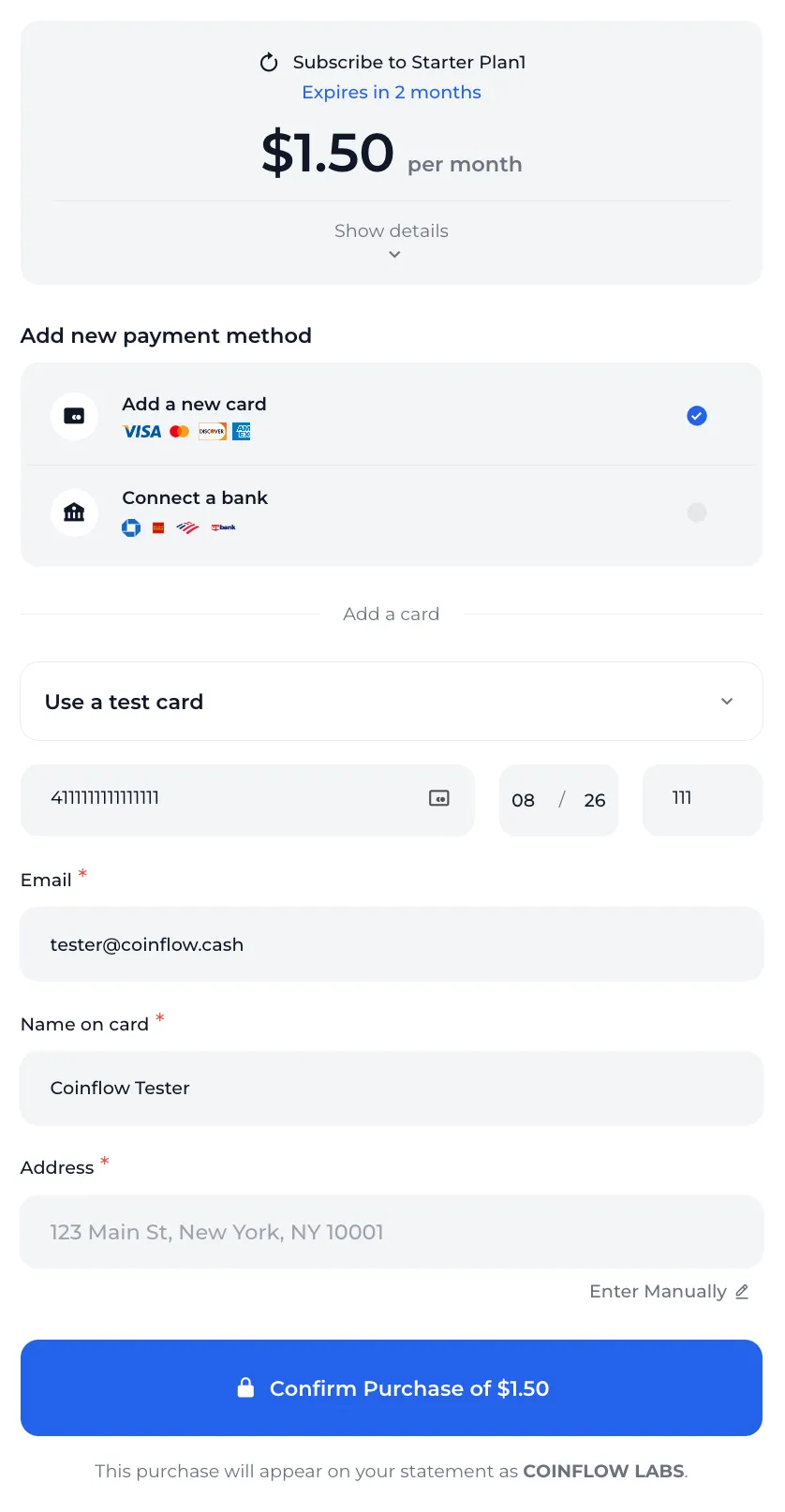
Component Display

How the `CoinflowPurchase` component looks configured for an existing subscription plan.

How the Subscription Purchase Works

When a customer subscribes:

  1. Payment Method: Customer provides a payment method (card or bank account)
  2. Initial Payment: The first payment is processed immediately
  3. Subscription Creation: If payment succeeds, the subscription is created with Active status
  4. Recurring Billing: Future payments are automatically processed according to the plan schedule

Note: If the first payment fails, the subscription is not created. The customer must retry the entire subscription purchase.

API Implementation

Follow these steps to implement subscriptions via direct API integration.

Step 1: Create a Subscription Plan

Create a subscription plan using the merchant API. This is a one-time setup for each plan you want to offer.

1curl --request POST \
2 --url https://api-sandbox.coinflow.cash/api/merchant/subscription/plans \
3 --header 'Authorization: YOUR_API_KEY' \
4 --header 'accept: application/json' \
5 --header 'content-type: application/json' \
6 --data '
7{
8 "interval": "Monthly",
9 "amount": {
10 "currency": "USD",
11 "cents": 1000
12 },
13 "name": "Gold Tier Plan",
14 "code": "12345",
15 "duration": 4,
16 "description": "A monthly subscription to gain access to our gold tier product suite",
17 "settlementType": "USDC"
18}
19'

Response:

1{
2 "merchant": "6840bca9c7cb21ee5baaae76",
3 "name": "Gold Tier Plan",
4 "code": "12345",
5 "interval": "Monthly",
6 "duration": 4,
7 "amount": {
8 "cents": 1000,
9 "currency": "USD"
10 },
11 "description": "A monthly subscription to gain access to our gold tier product suite",
12 "settlementType": "USDC",
13 "active": true,
14 "_id": "6851d74578269da7d5a533c4",
15 "__v": 0,
16 "id": "6851d74578269da7d5a533c4"
17}

Step 2: Get Available Subscription Plans

Get all available subscription plans that customers can purchase. Use this endpoint in your application to display plan options.

1curl --request GET \
2 --url https://api-sandbox.coinflow.cash/api/subscription/mello/plans \
3 --header 'accept: application/json' \
4 --header 'x-coinflow-auth-session-key: eyJhbGciOiJIUzI1NiIsInR5cCI6IkpXVCJ9.eyJjdXN0b21lcklkIjoiZHdheW5lam9obnNvbjc1IiwibWVyY2hhbnRJZCI6Im1lbGxvIiwiaWF0IjoxNzUwMTk0MDM5LCJleHAiOjE3NTAyODA0Mzl9.4WQPzfu6niH2S7oE7KATJY9r1D_PB_ssPajaRz4Pvsw'

Response:

1[
2 {
3 "id": "6851d74578269da7d5a533c4",
4 "name": "Gold Tier Plan",
5 "code": "12345",
6 "interval": "Monthly",
7 "duration": 4,
8 "amount": {
9 "cents": 1000,
10 "currency": "USD"
11 },
12 "description": "A monthly subscription to gain access to our gold tier product suite",
13 "settlementType": "USDC",
14 "active": true
15 }
16]

Step 3: Create Subscription with Credit Card

Enable customers to subscribe to a plan with a credit card. This processes the first payment and creates the subscription.

Important: You must tokenize the card before making this request. See the card tokenization guide for details.

1curl --request POST \
2 --url https://api-sandbox.coinflow.cash/api/subscription/mello/subscribers/card \
3 --header 'accept: application/json' \
4 --header 'content-type: application/json' \
5 --header 'x-coinflow-auth-session-key: eyJhbGciOiJIUzI1NiIsInR5cCI6IkpXVCJ9.eyJjdXN0b21lcklkIjoiZHdheW5lam9obnNvbjc1IiwibWVyY2hhbnRJZCI6Im1lbGxvIiwiaWF0IjoxNzUwMTk0MDM5LCJleHAiOjE3NTAyODA0Mzl9.4WQPzfu6niH2S7oE7KATJY9r1D_PB_ssPajaRz4Pvsw' \
6 --data '
7{
8 "card": {
9 "cardToken": "411111YJM5TX1111",
10 "expYear": "30",
11 "expMonth": "10",
12 "email": "test@gmail.com",
13 "firstName": "Dwayne",
14 "lastName": "Johnson",
15 "address1": "201 E Randolph Street",
16 "city": "Chicago",
17 "zip": "60625",
18 "state": "IL",
19 "country": "US"
20 },
21 "chargebackProtectionData": [
22 {
23 "productName": "Subscription plan",
24 "productType": "subscription",
25 "quantity": 1,
26 "rawProductData": {
27 "example": "{\"description\": \"subscription to gold tier products\", \"productsInGoldTier\": [\"celebrity access passes\", \"cool merchandise\"], \"tradible\": false}"
28 }
29 }
30 ],
31 "planCode": "12345"
32}
33'

Response:

c10d7ac6-cca8-436b-b99f-2c7418f1cbe1

Step 4: Enable Customer to Cancel Subscription

Allow customers to cancel their subscription when needed.

Get Customer Subscriptions

First, retrieve all subscriptions for the customer:

1# Gets all the subscriptions the customer is currently subscribed to
2# API Reference: /api-reference/api-reference/customers/get-customersubscriptions
3
4curl --request GET \
5 --url https://api-sandbox.coinflow.cash/api/subscription/mello/subscribers \
6 --header 'accept: application/json' \
7 --header 'x-coinflow-auth-session-key: eyJhbGciOiJIUzI1NiIsInR5cCI6IkpXVCJ9.eyJjdXN0b21lcklkIjoiZHdheW5lam9obnNvbjc1IiwibWVyY2hhbnRJZCI6Im1lbGxvIiwiaWF0IjoxNzUwMTk0MDM5LCJleHAiOjE3NTAyODA0Mzl9.4WQPzfu6niH2S7oE7KATJY9r1D_PB_ssPajaRz4Pvsw'

Response:

1[
2 {
3 "id": "6851d8c378269da7d5a535d6", // This is the subscriptionId
4 "customerId": "dwaynejohnson75",
5 "blockchain": "user",
6 "merchantId": "mello",
7 "email": "test@gmail.com",
8 "plan": "Gold Tier Plan",
9 "planCode": "12345",
10 "status": "Canceled"
11 }
12]

Cancel the Subscription

Use the subscription ID from the previous response to cancel:

1# Allows customer to cancel their subscription
2# See also: Cancel Subscription (by merchant) as an alternative for server-to-server cancellation
3# API Reference: /api/cancelsubscription
4
5curl --request PATCH \
6 --url https://api-sandbox.coinflow.cash/api/subscription/mello/subscribers/6851d8c378269da7d5a535d6 \
7 --header 'x-coinflow-auth-session-key: eyJhbGciOiJIUzI1NiIsInR5cCI6IkpXVCJ9.eyJjdXN0b21lcklkIjoiZHdheW5lam9obnNvbjc1IiwibWVyY2hhbnRJZCI6Im1lbGxvIiwiaWF0IjoxNzUwMTk0MDM5LCJleHAiOjE3NTAyODA0Mzl9.4WQPzfu6niH2S7oE7KATJY9r1D_PB_ssPajaRz4Pvsw'

Testing

To test credit card purchases for a subscription, please see our testing credit card purchase documentation.