Prebuilt Coinflow UI for Subscriptions

Use Coinflow's prebuilt purchase component to easily implement subscription purchases.

Overview

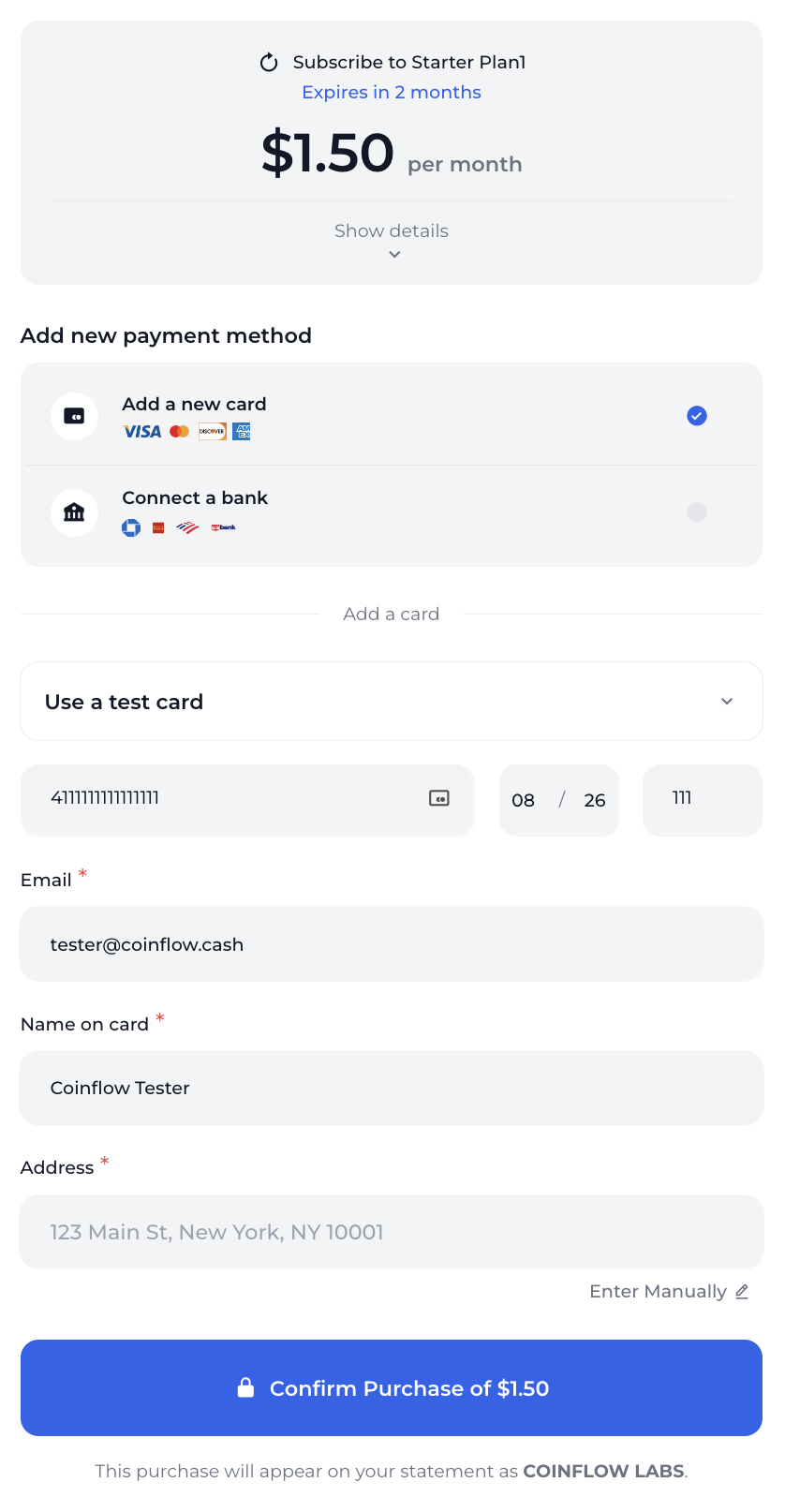
Coinflow provides a prebuilt UI component that makes it easy to implement subscription purchases without building your own payment interface. The CoinflowPurchase component handles the entire subscription purchase flow, including payment method collection, subscription creation, and initial payment processing.

When to Use This Method

Perfect For

Choose this when you want the fastest subscription integration

  • React or Next.js applications
  • Teams wanting to launch subscriptions quickly (hours to days)
  • Businesses validating subscription business models
  • Startups without dedicated payment UI resources
  • Standard subscription flows without complex customization
  • Platforms preferring Coinflow-maintained payment forms

Integration time: Hours, not days

Consider API Integration If

These scenarios benefit from custom API implementation

  • Non-React frameworks (Vue, Angular, vanilla JS, mobile)
  • Custom branded checkout matching your exact design
  • Complex subscription logic (trials, prorations, upgrades)
  • Custom payment flows beyond standard subscription purchase
  • Backend-only systems without frontend components
  • Multi-step checkout with additional business logic

→ See API Integration for full control

Start Simple, Customize Later

Most merchants begin with this prebuilt UI to validate their subscription offering (hours of integration), then migrate to API integration for custom experiences (1-2 weeks). Both methods support the same payment methods and features.


Installation

Install the Coinflow React package:

$npm i @coinflowlabs/react

Basic Implementation

To use the prebuilt purchase component for subscriptions, you need to:

  1. Import the CoinflowPurchase component
  2. Provide your merchantId and the subscription planCode
  3. Configure the component with appropriate callbacks

Example Implementation

1import { CoinflowPurchase } from '@coinflowlabs/react';
2
3function SubscriptionPurchase() {
4 return (
5 <CoinflowPurchase
6 sessionKey={'YOUR_SESSION_KEY'}
7 merchantId={'YOUR_MERCHANT_ID'}
8 env={'sandbox'} // Use 'prod' for production
9 onSuccess={(data) => {
10 console.log('Subscription created successfully:', data);
11 // Handle successful subscription creation
12 }}
13 planCode={'YOUR_PLAN_CODE'}
14 chargebackProtectionData={[
15 {
16 productName: "Subscription plan",
17 productType: "subscription",
18 quantity: 1,
19 rawProductData: {
20 description: "Monthly subscription to premium features",
21 features: ["Feature 1", "Feature 2", "Feature 3"]
22 }
23 }
24 ]}
25 />
26 );
27}

Component Preview

CoinflowPurchase component configured for subscriptions

Key Features

Automatic Plan Details Display

The component automatically fetches and displays:

  • Plan name and description
  • Subscription price
  • Billing frequency (Monthly/Yearly)
  • Duration (if applicable)

Multiple Payment Methods

The prebuilt UI supports:

  • Credit/Debit Cards - Visa, Mastercard, American Express, Discover
  • ACH Bank Transfers - Direct bank account payments
  • Saved Payment Methods - Returning customers can use previously saved cards or bank accounts

Built-in Features

  • Secure Payment Processing - PCI-compliant card handling
  • Responsive Design - Works on desktop and mobile devices
  • Customizable Branding - Match your brand colors and style
  • Error Handling - Clear error messages for failed payments
  • Loading States - Smooth loading indicators during processing

Configuration Options

Required Props

PropTypeDescription
sessionKeystringAuthentication token for the customer session
merchantIdstringYour Coinflow merchant identifier
planCodestringThe unique code for the subscription plan
envstringEnvironment: ‘sandbox’ or ‘prod’

Optional Props

PropTypeDescription
onSuccessfunctionCallback when subscription is created successfully
onErrorfunctionCallback when an error occurs
chargebackProtectionDataarrayProduct information for chargeback protection
themeobjectCustom theme colors and styling

Subscription Flow

When a customer uses the prebuilt UI:

  1. Plan Display - The component shows the subscription details
  2. Payment Method - Customer enters credit card or connects bank account
  3. Initial Payment - First payment is processed immediately
  4. Subscription Creation - If payment succeeds, subscription is created
  5. Recurring Billing - Future payments are automatically processed according to the plan schedule

Session Key Generation

Before using the component, you must generate a session key for the customer on your backend:

1// Server-side code to generate session key
2const response = await fetch('https://api-sandbox.coinflow.cash/api/session-key', {
3 method: 'POST',
4 headers: {
5 'Authorization': 'YOUR_API_KEY',
6 'Content-Type': 'application/json'
7 },
8 body: JSON.stringify({
9 customerId: 'customer-unique-id',
10 merchantId: 'YOUR_MERCHANT_ID'
11 })
12});
13
14const { sessionKey } = await response.json();

Important: Session keys should be generated server-side to protect your API key. Never expose your API key in client-side code.

For more details, see the session key API reference.

Chargeback Protection

Include product details to enable chargeback protection:

1chargebackProtectionData={[
2 {
3 productName: "Premium Subscription",
4 productType: "subscription",
5 quantity: 1,
6 rawProductData: {
7 description: "Monthly subscription to premium features",
8 planType: "premium",
9 features: [
10 "Unlimited access",
11 "Priority support",
12 "Advanced analytics"
13 ],
14 tradable: false
15 }
16 }
17]}

Customization

Theme Customization

Customize the component appearance to match your brand:

1<CoinflowPurchase
2 // ... other props
3 theme={{
4 primary: '#2563eb',
5 background: '#ffffff',
6 backgroundAccent: '#f3f4f6',
7 textColor: '#111827',
8 textColorAccent: '#6b7280'
9 }}
10/>

Custom Callbacks

Handle subscription events:

1<CoinflowPurchase
2 // ... other props
3 onSuccess={(data) => {
4 // Subscription created successfully
5 console.log('Subscription ID:', data.subscriptionId);
6 // Redirect user to success page
7 window.location.href = '/subscription/success';
8 }}
9 onError={(error) => {
10 // Handle errors
11 console.error('Subscription error:', error);
12 // Show error message to user
13 }}
14/>

Testing

To test subscriptions in sandbox mode:

  1. Use the sandbox environment: env={'sandbox'}
  2. Use test credit cards from our testing guide
  3. For ACH testing, use Plaid’s test credentials

Test Cards

  • Successful Payment: 4111 1111 1111 1111
  • Declined Payment: 4000 0000 0000 0002
  • Insufficient Funds: 4000 0000 0000 9995

Use any future expiration date and any 3-digit CVV.

Next Steps