

For AI agents: a documentation index is available at the root level at /llms.txt and /llms-full.txt. Append /llms.txt to any URL for a page-level index, or .md for the markdown version of any page.
RegisterLoginSandbox Login
GuidesRecipesAPI Reference
  • Getting Started
    • Getting Started with Checkout
    • ACH Checkout
    • Card Checkout with Credits
    • Card Checkout
    • Direct USDC Settlement
    • Fiat/Crypto Pay-ins
    • Secure Marketplace Checkout
    • EVM Checkout
    • How to Enable Checkout with Credit Cards
    • Quick Start Marketplace Implementation
    • Payouts
    • Common FAQs
  • Checkout
    • Settlement Locations
    • Checkout Webhooks
  • Payouts
    • Payout Overview
    • What is a Payout
        • Delegated Payout from Merchant Wallet
        • Delegated Payout from User Self-Custodial Wallet
  • Subscriptions
    • Subscriptions Overview
  • Marketplaces
    • Marketplace Overview
    • How Marketplaces Work
    • How to Withdraw USDC
    • Countries Eligible for USDC Withdraw
    • Marketplaces Webhooks
    • Marketplaces Implementation
  • Developer Resources
    • Custom Branding
    • Checkout Implementation
    • Webhooks
  • Merchant Dashboard
    • Login & Account Access
    • Users and Roles
    • Rate Limits
    • Developer Contact
LogoLogo
RegisterLoginSandbox Login
On this page
  • User Self-Custodial Wallet Payout
  • How It Works
  • Flow of Funds
  • When to Use This Flow
  • Implementation Options
  • Option 1: Using Coinflow’s React SDK
  • Option 2: Using Coinflow’s API
  • Key Considerations
  • Gasless Transactions
  • Next Steps
PayoutsUnderstand Your Flow of FundsUser Payout

Delegated Payout from User Self-Custodial Wallet

Was this page helpful?
Previous

Getting Started with Implementing Payouts

This guide outlines the core concepts required to implement payout flows supported through Coinflow. Before integrating withdrawals, developers should work with stakeholders to determine the right payout flow for your use case and configure each required step accordingly.
Next
Built with

User Self-Custodial Wallet Payout

In this flow, users directly control their own crypto wallets and initiate payouts themselves. Coinflow facilitates the off-ramp by converting their stablecoins to fiat.

How It Works

  1. User connects their wallet to your platform
  2. User initiates withdrawal through Coinflow’s UI or your integration
  3. User signs transaction from their wallet
  4. Funds transfer from user’s wallet to Coinflow
  5. Coinflow processes fiat payout to user’s bank account/card
  6. User receives funds in their selected payout destination

Flow of Funds
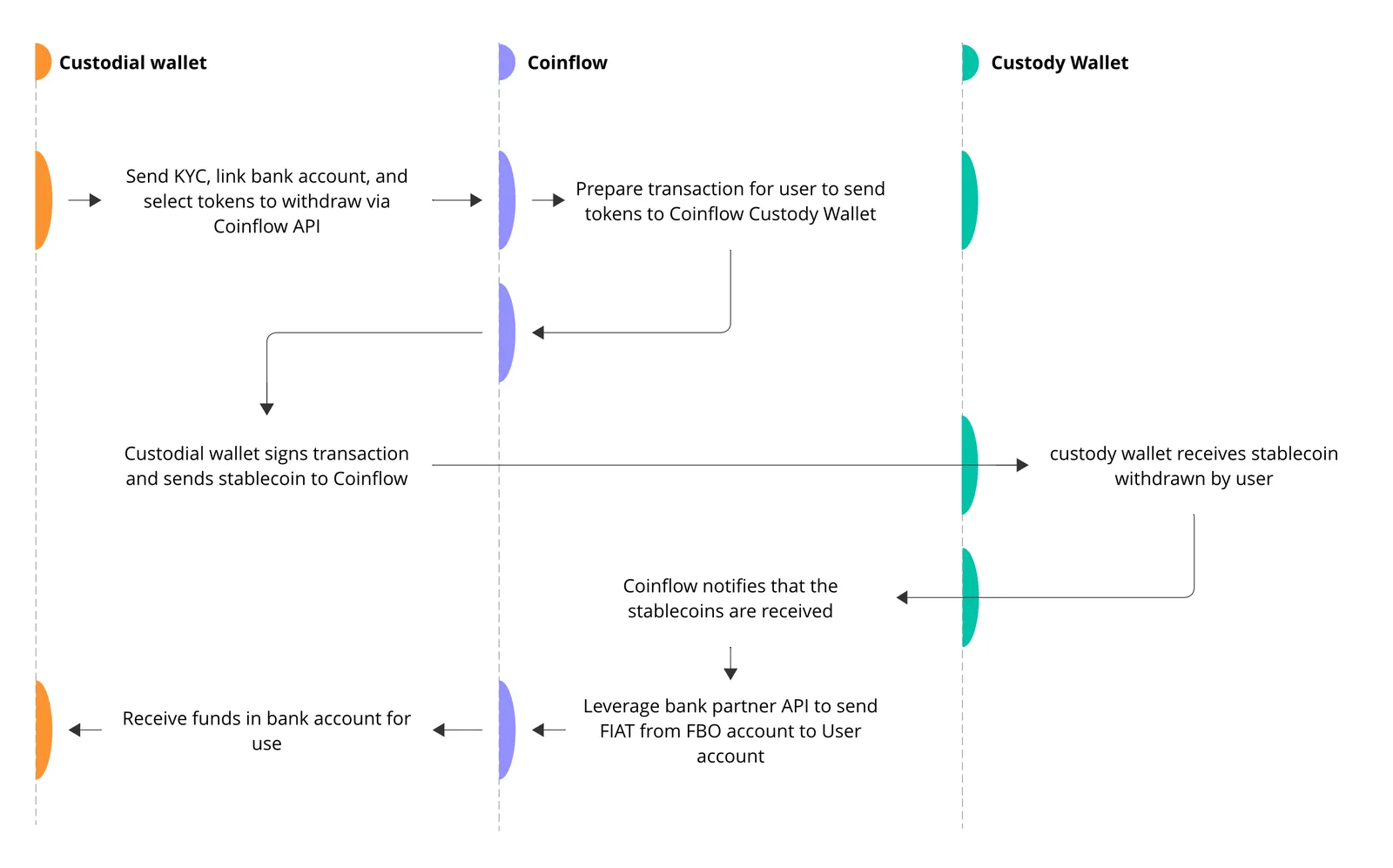
User's Wallet (USDC/EUROe) → Coinflow → User's Bank Account/Card (Fiat)
Flow of Funds for a payout initiated from end-user's custodial wallet.

When to Use This Flow

  • DeFi applications - Where users control their own wallets
  • Web3 gaming - Where in-game assets are on-chain NFTs
  • Crypto-native platforms - Where users are comfortable with wallets
  • Decentralized marketplaces - Where users have custody of their funds

Implementation Options

Option 1: Using Coinflow’s React SDK

See implementation guide →

Advantages:

  • Pre-built UI components
  • Handles KYC flow
  • Manages bank authentication
  • Fastest implementation

Option 2: Using Coinflow’s API

See implementation guide →

Advantages:

  • Full control over UX
  • Custom integration
  • Mobile app support

Key Considerations

  • User Identification: Uses wallet addresses (not user IDs)
  • KYC Required: Each user must complete verification before their first payout
  • Wallet Requirements:
    • User must have USDC/EUROe balance
    • User must have gas fees (or use gasless transactions)
    • Wallet must support message signing
  • Supported Blockchains: Solana, Ethereum, Base, Polygon, Arbitrum, Stellar
  • Gas Fees: Users pay gas (or you can enable gasless transactions)

Gasless Transactions

Coinflow supports gasless withdrawals for USDC on EVM chains, where users don’t need ETH/MATIC for gas. Learn more →

Next Steps

  1. Choose your implementation method (SDK or API)
  2. Follow the implementation guide
  3. Configure KYC and bank authentication
  4. Test in sandbox environment