

For AI agents: a documentation index is available at the root level at /llms.txt and /llms-full.txt. Append /llms.txt to any URL for a page-level index, or .md for the markdown version of any page.
RegisterLoginSandbox Login
GuidesRecipesAPI Reference
  • Getting Started
    • Getting Started with Checkout
    • ACH Checkout
    • Card Checkout with Credits
    • Card Checkout
    • Direct USDC Settlement
    • Fiat/Crypto Pay-ins
    • Secure Marketplace Checkout
    • EVM Checkout
    • How to Enable Checkout with Credit Cards
    • Quick Start Marketplace Implementation
    • Payouts
    • Common FAQs
  • Checkout
      • Currency Presentment
          • About Token Payments
          • Supported Tokens and Chains
          • Implement Crypto Payments
          • About Passive Crypto Pay-In Addresses
          • Implement Passive Crypto Pay-In Addresses
      • Supported Countries
    • Settlement Locations
    • Checkout Webhooks
  • Payouts
    • Payout Overview
    • What is a Payout
  • Subscriptions
    • Subscriptions Overview
  • Marketplaces
    • Marketplace Overview
    • How Marketplaces Work
    • How to Withdraw USDC
    • Countries Eligible for USDC Withdraw
    • Marketplaces Webhooks
    • Marketplaces Implementation
  • Developer Resources
    • Custom Branding
    • Checkout Implementation
    • Webhooks
  • Merchant Dashboard
    • Login & Account Access
    • Users and Roles
    • Rate Limits
    • Developer Contact
LogoLogo
RegisterLoginSandbox Login
On this page
  • 1. Display Supported Tokens and Chains
  • 2. Initiate Payment
  • 3. Send Funds
  • Refunds
CheckoutPayment MethodsPayment MethodsCrypto Payments

How to: Implement Crypto Checkout (API)

Use this guide to allow users to make crypto payments with supported tokens/chains from a few simple API calls.

Was this page helpful?
Previous

🪪 Passive Crypto Pay-In Addresses

Mint a persistent, customer-scoped crypto deposit address that accepts variable-amount stablecoin pay-ins on supported chains. Funds sent to the address are automatically credited to the merchant as USDC.

Next
Built with

1. Display Supported Tokens and Chains

Upon a user initiating a checkout, you can display which tokens they are able to make payments with by calling the Get Supported Tokens endpoint:

Request
1//GET merchant filtered chains/tokens
2curl --location 'http://api-sandbox.coinflow.cash/api/checkout/crypto' \
3 --header 'Authorization: {api_key}'
Response
1{
2 "chains": [
3 {
4 "name": "Polygon Amoy",
5 "image": "https://static.paywithglide.xyz/logos/polygon-9146df3f.png",
6 "tokens": [
7 {
8 "name": "Polygon",
9 "symbol": "POL",
10 "image": "https://static.buildwithglide.com/logos/polygon-cc6bc8a0.png"
11 },
12 {
13 "name": "USDC",
14 "symbol": "USDC",
15 "image": "https://static.buildwithglide.com/logos/usdc-8aaf5df7.png"
16 }
17 ]
18 },
19 {
20 "name": "Bitcoin Testnet",
21 "image": "https://static.paywithglide.xyz/logos/bitcoin-70a39ca6.png",
22 "tokens": [
23 {
24 "name": "Bitcoin",
25 "symbol": "BTC",
26 "image": "https://static.buildwithglide.com/logos/bitcoin-0a8c6622.png"
27 }
28 ]
29 },
30 {
31 "name": "Solana Devnet",
32 "image": "https://static.paywithglide.xyz/logos/solana-7228edcd.png",
33 "tokens": [
34 {
35 "name": "Solana",
36 "symbol": "SOL",
37 "image": "https://static.buildwithglide.com/logos/solana-17116195.png"
38 },
39 {
40 "name": "USDC",
41 "symbol": "USDC",
42 "image": "https://static.buildwithglide.com/logos/usdc-8aaf5df7.png"
43 }
44 ]
45 }
46 ]
47}

If you see an error response for this endpoint, contact your Coinflow integrations contact to see if you can get Crypto payments enabled on your account.

2. Initiate Payment

Once the user enters which token and chain they will be making their payment on, you can pass Coinflow the user’s wallet, blockchain, and the payment amount in order to initiate a payment job.

Request
1//POST create payin session
2curl --request POST \
3 --url https://api-sandbox.coinflow.cash/api/checkout/crypto \
4 --header 'Authorization: YOUR_API_KEY' \
5 --header 'accept: application/json' \
6 --header 'content-type: application/json' \
7 --header 'x-coinflow-auth-user-id: user123' \
8 --data '
9{
10 "subtotal": {
11 "currency": "USD",
12 "cents": 200
13 },
14 "token": "USDC",
15 "chain": "Solana Devnet", // Replace with
16 "email": "test@gmail.com"
17}
18'
Response
1{
2 "sessionId": "da0f4e8c-b9dd-422c-8c5d-41e6355f8c83",
3 "depositAddress": "Hq9UakGv9REcTVoErU41sJeh5L6GfHM1ormgtgiAd8VX",
4 "paymentChainName": "Solana Devnet",
5 "paymentCurrencySymbol": "USDC",
6 "paymentAmount": "2.01",
7 "commission": "0.01",
8 "chainLogoUrl": "https://static.paywithglide.xyz/logos/solana-7228edcd.png",
9 "currencyLogoUrl": "https://static.buildwithglide.com/logos/usdc-8aaf5df7.png"
10}

3. Send Funds

The payer is then responsible for navigating to their own crypto wallet to send the paymentAmount + commission to the depositAddress.

Below is an example showing how USDC was sent on solana devnet through a payer’s wallet connector. In this example, we use Phantom but users can pay from anywhere as long as they have tokens available in a wallet. If you are testing sending non-stable tokens, feel free to use Google’s faucet to send the needed token.
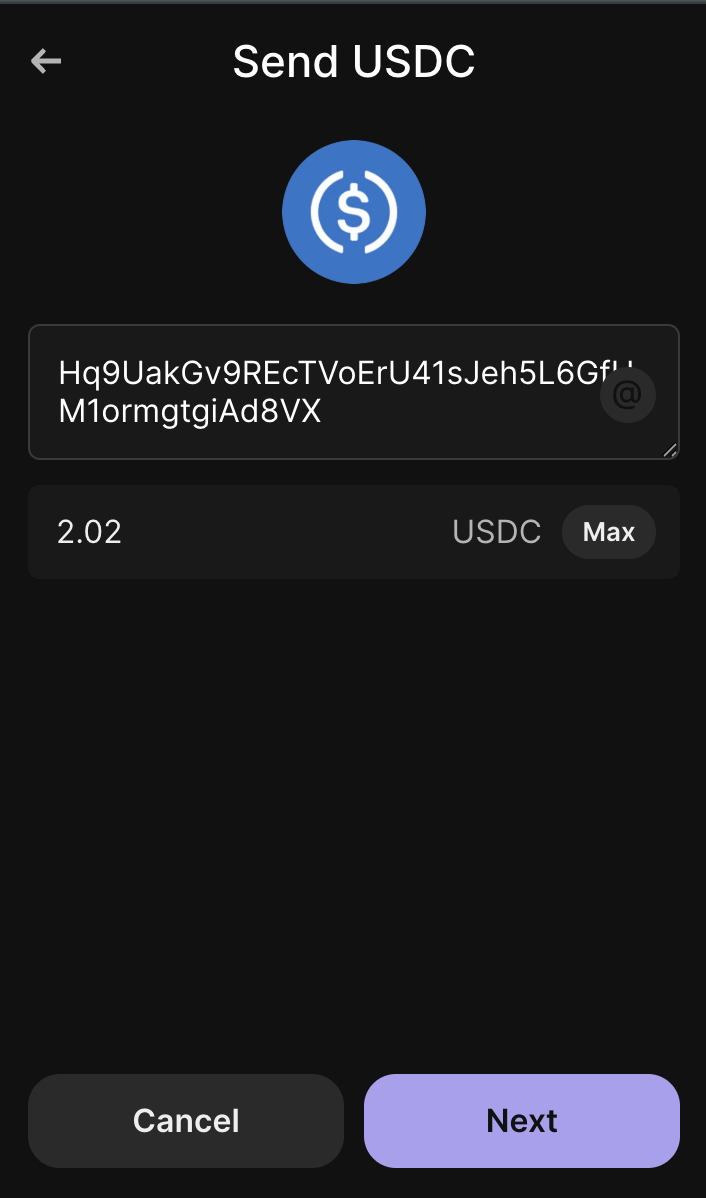

After a successful response, the payment should show up in your merchant dashboard as “Initiated”. From here, the user will take the deposit address given in the success response, and send the displayed payment amount via their crypto wallet.

Refunds

If the user sends the correct amount/token/chain associated with the initiated payment, then this should instantly go through as “Settled”. If the user paid with the correct token/chain, but overpaid, we will still settle this payment but will refund the user the overpaid amount. If underpaid or on incorrect token/chain, we will automatically initiate a refund for this payment.