
How To: Implement Merchant Payouts (From BYO Wallet)
How To: Implement Merchant Payouts (From BYO Wallet)
Developers can use this documentation to implement merchant payouts (from your own crypto wallet) to an end-user’s bank account.

How To: Implement Merchant Payouts (From BYO Wallet)
Developers can use this documentation to implement merchant payouts (from your own crypto wallet) to an end-user’s bank account.
This guide enables merchants to send fiat payouts to end-users’ bank accounts using your own crypto wallet as the source of funds. All payouts are processed via API integration.
Have your merchant crypto wallet ready as the source of funds
Review the merchant payout flow before implementation
Coinflow does not provide a pre-built UI for merchant payouts - API integration required
Your wallet must be able to sign transactions on the blockchain
Important Implementation Note
This flow is similar to the Merchant (Coinflow Wallet) Payout flow except for the endpoint used to initiate payouts (Step 5). Make sure to understand your flow of funds before proceeding.
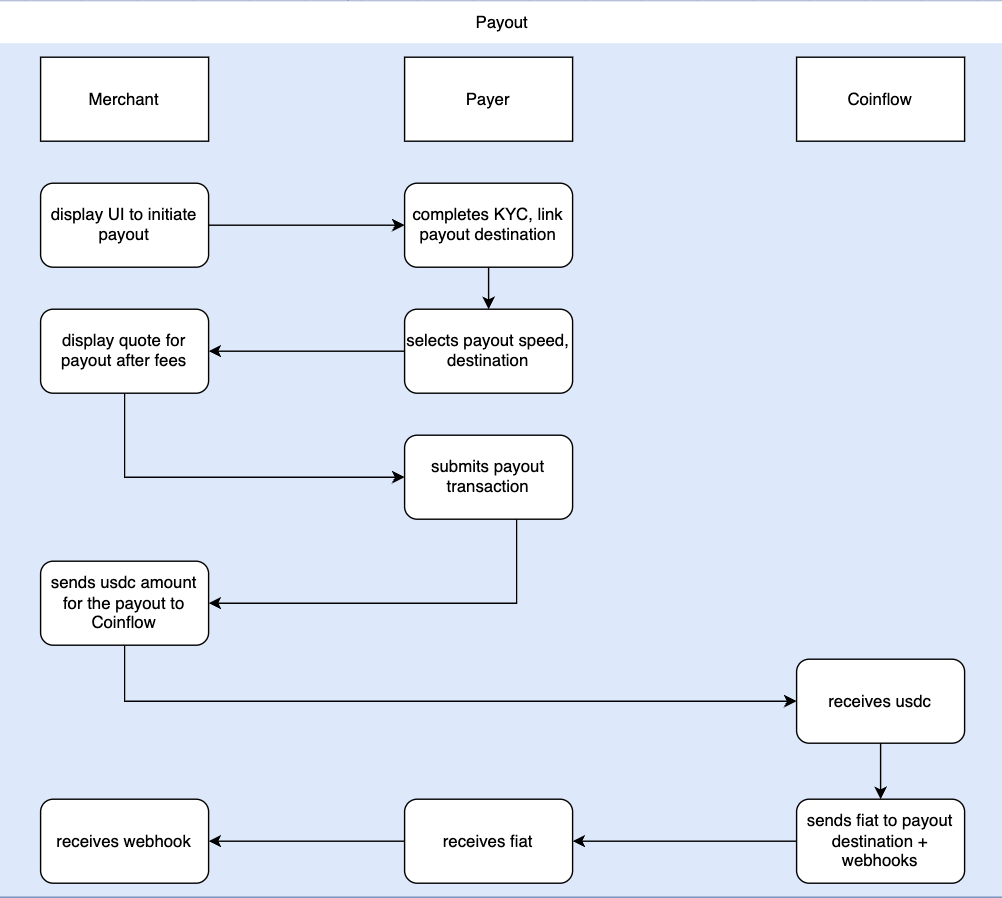
To complete a payout/withdraw, every Withdrawer must complete verification before they can proceed with a payout through Coinflow. Withdrawers only need to KYC the first time they withdraw and do not need to KYC again for any subsequent withdrawals.
Choose your KYC implementation method:
Merchants who want to use Coinflow for KYC should call Register User.
U.S. Withdrawers
Endpoint: POST /api/withdraw/kyc
Non-U.S. Withdrawers
Endpoint: POST /api/withdraw/kyc
Merchants who want to pass KYC data from their existing KYC provider can call our Register User via Document endpoint.
Endpoint: POST /api/withdraw/kyc-doc
Merchants must receive approval from the Coinflow Compliance team regarding approval of your KYC attestation program. Once you’ve receive approval, follow these implementation steps.
After calling Coinflow’s withdraw endpoints, you must call Get Withdrawer to get the latest verification status. This endpoint will tell you the user’s verification status. The get withdrawer endpoint can also be queried at any time to get more information about a withdrawer who has already completed KYC/KYB.
Endpoint: GET /api/withdraw
Want to use Coinflow’s UI for KYC and Bank Authentication?
Merchants can choose to use Coinflow’s UI for KYC and bank authentication, saving time by avoiding the need to build these flows and add payout destinations. You’ll only need to create the UI for displaying quotes and initiating payouts.
If you choose to use our UI, you do not need to separately implement Step 3: Add A Payout Destination as the bank auth UI also handles linking payout destinations.
Withdrawers must link a payout destination so we know where to send the funds.
If withdrawers are in the U.S. and want to receive USD, they can link their debit card or bank account.
If withdrawers reside in the EU or UK, they can link their IBAN to receive EUR or GBP.
If withdrawers reside in Brazil, they can link their PIX account to receive BRL.
Merchants may show an estimated quote of how much the user will receive after fees. See list of USDC token addresses to pass as token by chain.
Endpoint: GET /api/withdraw/quote
This endpoint enables a user to submit a payout from your own wallet on the chain you specify. Upon sending the request, funds from your own merchant wallet balance will decrement, and the end-user will receive their funds in their selected payout destination.
Getting the Tokenized Account
To get the tokenized bank account / IBAN / PIX / debit card, call get withdrawer and reference the token param. For example, for bank account: bankAccounts[0]['token']
Speed Options:
Pass any of the following as the speed depending on the payout method the withdrawer selects:
card - Instant debit card payoutsasap - Instant, RTP payoutsame_day - Same day ACH payoutstandard - Standard ACH payoutiban - SEPA payoutpix - PIX payoutEndpoint: POST /api/merchant/withdraws/payout
Now that you’ve implemented merchant payouts from your own wallet, here’s what to do next: