Implement Subscriptions

Developers can use this guide to implement subscriptions via UI or API

UI Implementation

  1. Install the latest Coinflow packages.
    npm i @coinflowlabs/react
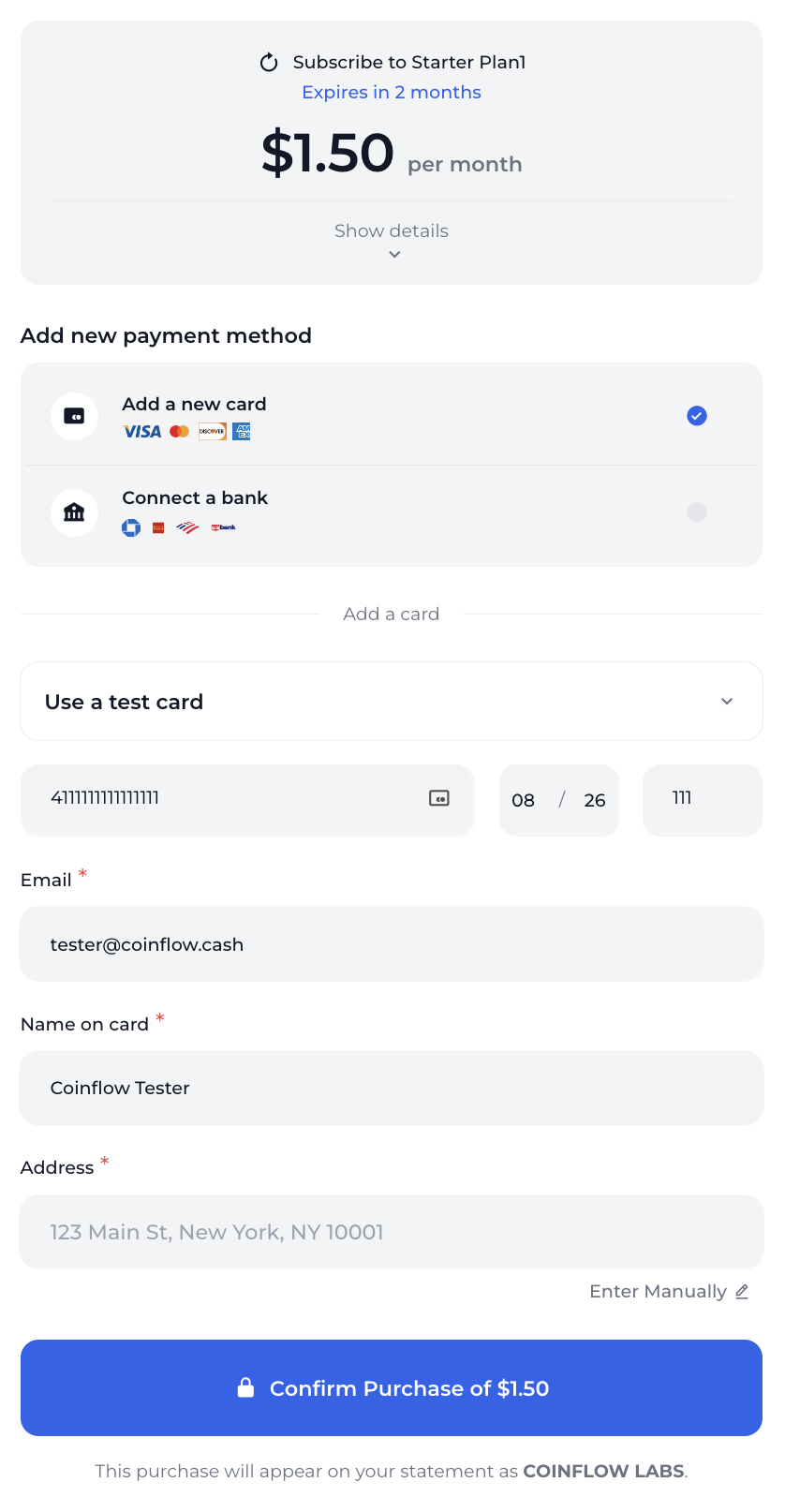
  2. To use the provided purchase page to buy a subscription, the merchantId and planCode need to be supplied in the CoinflowPurchase component.
  3. The subscription cost and information will automatically populate the form.
Javascript
1// Example of how to configure CoinflowPurchase for subscriptions
2<CoinflowPurchase
3 sessionKey={'eyJhbGciOiJIUzI1NiIsInR5cCI6IkpXVCJ9.eyJjdXN0b21lcklkIjoiZHdheW5lam9obnNvbjc1IiwibWVyY2hhbnRJZCI6Im1lbGxvIiwiaWF0IjoxNzUwMTk0MDM5LCJleHAiOjE3NTAyODA0Mzl9.4WQPzfu6niH2S7oE7KATJY9r1D_PB_ssPajaRz4Pvsw'}
4 merchantId={'YOUR_MERCHANT_ID'}
5 env={'sandbox'} // Change to Prod for production
6 onSuccess={(...args) => {
7 console.log('Purchase Success', args); //Create your own on success func after payment success
8 }}
9 chargebackProtectionData={[
10 {
11 "productName": "Subscription plan",
12 "productType": "subscription",
13 "quantity": 1,
14 "rawProductData": {
15 "example": "description\": \"subscription to gold tier products\", \"productsInGoldTier\": [\"celebrity access passes\", \"cool merchandise\"], \"tradible\": false}"
16 }
17 }
18 ]}
19 planCode={'12345'}
20 />
How the `CoinflowPurchase` component looks configured for an existing subscription plan.

How the CoinflowPurchase component looks configured for an existing subscription plan.

Subscribing to a Plan

The customer will need to provide a payment method, confirm the purchase, and then subscription purchase will be created. Upon creation of the subscription, the first payment will be drawn (if payment fails, subscription creation fails). The subscription will then be active and schedule payments as defined.


API Implementation

1.Create a subscription plan (This is for the merchant only)

Request
1curl --request POST \
2 --url https://api-sandbox.coinflow.cash/api/merchant/subscription/plans \
3 --header 'Authorization: YOUR_API_KEY' \
4 --header 'accept: application/json' \
5 --header 'content-type: application/json' \
6 --data '
7{
8 "interval": "Monthly",
9 "amount": {
10 "currency": "USD",
11 "cents": 1000
12 },
13 "name": "Gold Tier Plan",
14 "code": "12345",
15 "duration": 4,
16 "description": "A monthly subscription to gain access to our gold tier product suite",
17 "settlementType": "USDC"
18}
19'
Response
{
"merchant": "6840bca9c7cb21ee5baaae76",
"name": "Gold Tier Plan",
"code": "12345",
"interval": "Monthly",
"duration": 4,
"amount": {
"cents": 1000,
"currency": "USD"
},
"description": "A monthly subscription to gain access to our gold tier product suite",
"settlementType": "USDC",
"active": true,
"_id": "6851d74578269da7d5a533c4",
"__v": 0,
"id": "6851d74578269da7d5a533c4"
}

2.Get All Available Subscription Plans Available for purchase by a customer

Request
1curl --request GET \
2 --url https://api-sandbox.coinflow.cash/api/subscription/mello/plans \
3 --header 'accept: application/json' \
4 --header 'x-coinflow-auth-session-key: eyJhbGciOiJIUzI1NiIsInR5cCI6IkpXVCJ9.eyJjdXN0b21lcklkIjoiZHdheW5lam9obnNvbjc1IiwibWVyY2hhbnRJZCI6Im1lbGxvIiwiaWF0IjoxNzUwMTk0MDM5LCJleHAiOjE3NTAyODA0Mzl9.4WQPzfu6niH2S7oE7KATJY9r1D_PB_ssPajaRz4Pvsw'
Response
[
{
"id": "6851d74578269da7d5a533c4",
"name": "Gold Tier Plan",
"code": "12345",
"interval": "Monthly",
"duration": 4,
"amount": {
"cents": 1000,
"currency": "USD"
},
"description": "A monthly subscription to gain access to our gold tier product suite",
"settlementType": "USDC",
"active": true
}
]

4. Enable an end user to make a purchase for a subscription plan with a new credit card
Note: You will need to tokenize the card, similar to how you’ve done in card checkouts.

Request
1curl --request POST \
2 --url https://api-sandbox.coinflow.cash/api/subscription/mello/subscribers/card \
3 --header 'accept: application/json' \
4 --header 'content-type: application/json' \
5 --header 'x-coinflow-auth-session-key: eyJhbGciOiJIUzI1NiIsInR5cCI6IkpXVCJ9.eyJjdXN0b21lcklkIjoiZHdheW5lam9obnNvbjc1IiwibWVyY2hhbnRJZCI6Im1lbGxvIiwiaWF0IjoxNzUwMTk0MDM5LCJleHAiOjE3NTAyODA0Mzl9.4WQPzfu6niH2S7oE7KATJY9r1D_PB_ssPajaRz4Pvsw' \
6 --data '
7{
8 "card": {
9 "cardToken": "411111YJM5TX1111",
10 "expYear": "30",
11 "expMonth": "10",
12 "email": "test@gmail.com",
13 "firstName": "Dwayne",
14 "lastName": "Johnson",
15 "address1": "201 E Randolph Street",
16 "city": "Chicago",
17 "zip": "60625",
18 "state": "IL",
19 "country": "US"
20 },
21 "chargebackProtectionData": [
22 {
23 "productName": "Subscription plan",
24 "productType": "subscription",
25 "quantity": 1,
26 "rawProductData": {
27 "example": "{\"description\": \"subscription to gold tier products\", \"productsInGoldTier\": [\"celebrity access passes\", \"cool merchandise\"], \"tradible\": false}"
28 }
29 }
30 ],
31 "planCode": "12345"
32}
33'
Response
c10d7ac6-cca8-436b-b99f-2c7418f1cbe1

5. Enable an end user to cancel their subscription

Request
// Gets all the subscriptions the customer is currently subscribed to. https://docs.coinflow.cash/api-reference/api-reference/customers/get-customersubscriptions
curl --request GET \
--url https://api-sandbox.coinflow.cash/api/subscription/mello/subscribers \
--header 'accept: application/json' \
--header 'x-coinflow-auth-session-key: eyJhbGciOiJIUzI1NiIsInR5cCI6IkpXVCJ9.eyJjdXN0b21lcklkIjoiZHdheW5lam9obnNvbjc1IiwibWVyY2hhbnRJZCI6Im1lbGxvIiwiaWF0IjoxNzUwMTk0MDM5LCJleHAiOjE3NTAyODA0Mzl9.4WQPzfu6niH2S7oE7KATJY9r1D_PB_ssPajaRz4Pvsw'
Response
// Response to Get Customer Subscriptions
[
{
"id": "6851d8c378269da7d5a535d6", // This is the subscriptionId
"customerId": "dwaynejohnson75",
"blockchain": "user",
"merchantId": "mello",
"email": "test@gmail.com",
"plan": "Gold Tier Plan",
"planCode": "12345",
"status": "Canceled"
}
]
Request
1// Allows customer to cancel the subscription. See Cancel Subscription (by merchant) as an alternative s2s cancellation: https://docs.coinflow.cash/reference/cancelsubscription
2
3curl --request PATCH \
4 --url https://api-sandbox.coinflow.cash/api/subscription/mello/subscribers/6851d8c378269da7d5a535d6 \
5 --header 'x-coinflow-auth-session-key: eyJhbGciOiJIUzI1NiIsInR5cCI6IkpXVCJ9.eyJjdXN0b21lcklkIjoiZHdheW5lam9obnNvbjc1IiwibWVyY2hhbnRJZCI6Im1lbGxvIiwiaWF0IjoxNzUwMTk0MDM5LCJleHAiOjE3NTAyODA0Mzl9.4WQPzfu6niH2S7oE7KATJY9r1D_PB_ssPajaRz4Pvsw'

Testing

To test credit card purchases for a subscription, please see our testing credit card purchase documentation.

